

Wispr Flow has nearly 18,000 ratings on the US App Store
Wispr Flow enters what you say, cleaned up, into any app's text field. It's made by Wispr, Inc. in the US and runs on Mac, Windows, iPhone and Android. In August 2026 it was reported to have raised $280 million at a $2 billion valuation1.
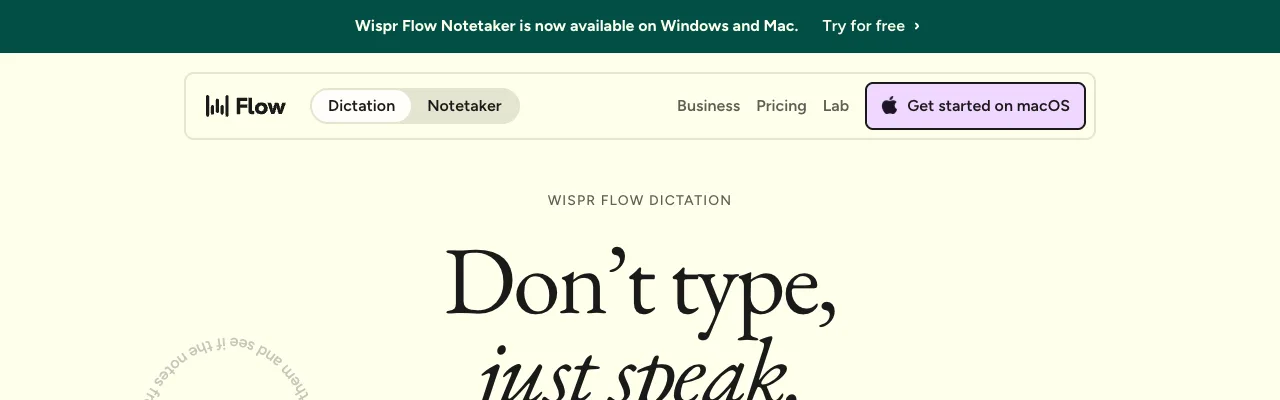
The headline is "Don't type, just speak."
Its number of US App Store ratings far exceeds that of the other tools we checked (as of 2026-10-25)2:
- App Store (US): 4.8 stars (17,980 ratings)
- App Store (Japan): 4.7 stars (175 ratings)
- Product Hunt: the Mac app (2024-09-30), the Windows app (2025-03-12) and its meeting-notes feature (2026-08-05) were each #1 Product of the Day
In the US, Pro is $15 a month; elsewhere, prices are fixed per region with no tax added
In the US, Pro is $15 a month, or $12 a month billed annually. The free plan allows 2,000 words a week on desktop.
What you see depends on where you are. Here's the pricing page opened from Japan:
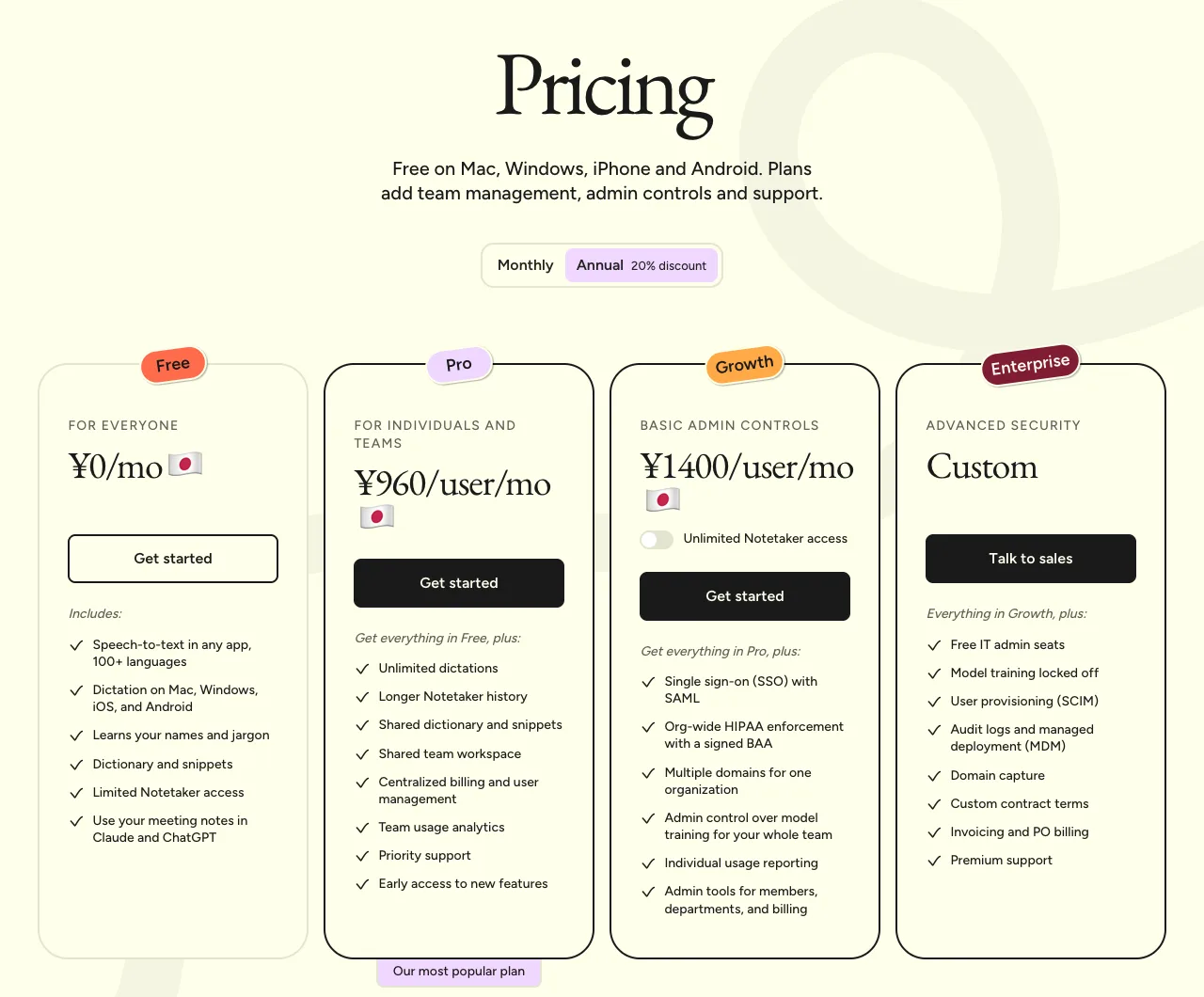
The yen price isn't a conversion from dollars. The help center explains:
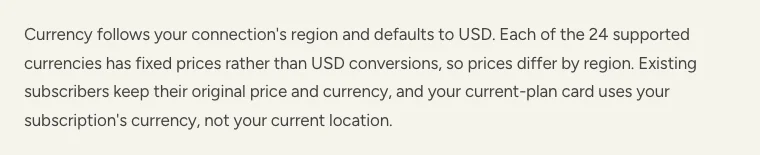
- The currency is set by the region you connect from (US dollars otherwise)
- Prices are fixed in each of 24 currencies, so they differ by region
- If you already subscribe, you keep the price and currency you signed up with
Tax is covered in a separate help article.
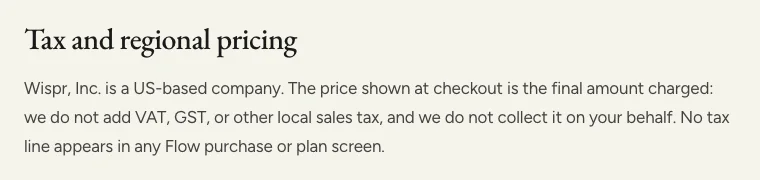
It says the price you see is the amount you're charged, with no VAT or sales tax added on top. Among the overseas products we checked in our “pricing table”, Wispr Flow was the only one to state this officially.
 Read nextAI dictation app pricing compared (October 2026)Dictation app prices change more often than you'd think. This October, one product raised its price within the two days between our checks. We opened each company's pricing page, recorded prices exactly as shown, and kept screenshots. We'll re-check the same way every month.
Praise in the reviews we checked: accuracy that needs almost no fixing
| Positive feedback | What they say | Example sources |
|---|---|---|
| Accurate; almost no fixing | No typos or wrong words | App Store (US) reviews3 |
| Fast, and works in any app | On Mac, holding the Fn key while you speak feels smooth | Product Hunt reviews (Feb and Aug 2026)4 |
| Cleans up fillers and restarts | Cuts unneeded words and fixes restarts into tidy sentences | App Store (US) reviews5 |
| Helps people with physical limitations | Reviews from people with carpal tunnel syndrome or a broken hand | App Store (US) reviews6 |
To format your text, it also uses the text around the field you're typing in
In the posts we checked where people named a reason for leaving Wispr Flow, data handling came up most often. First, the official explanation:
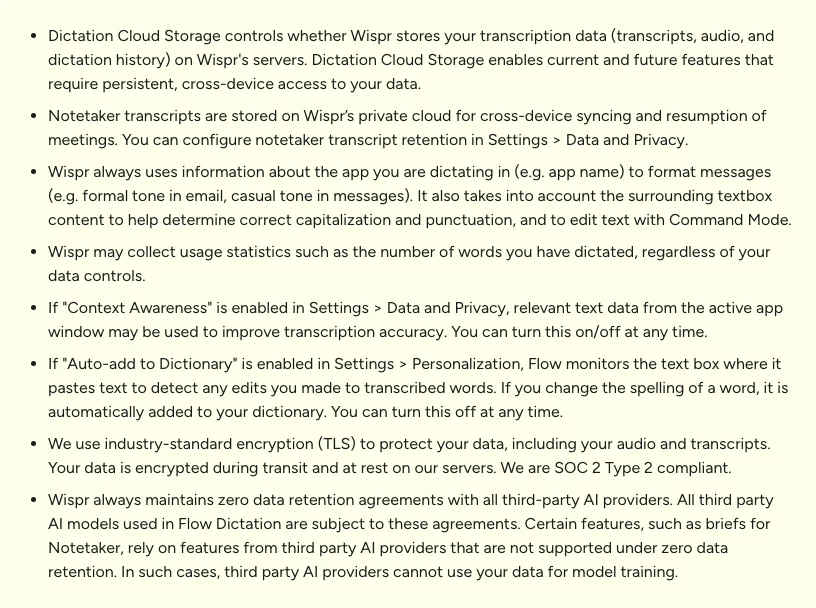
This section explains what it uses, and what you can turn off:
| What it uses | Official explanation | Can you turn it off? |
|---|---|---|
| The name of the app you're typing in, and the text around the field | Always used to decide style and punctuation | Not stated |
| Text from apps open on screen (Context Awareness) | May be used to improve recognition accuracy | Yes |
| The text field after pasting (Auto-add to Dictionary) | Checked to add your corrections to the dictionary | Yes |
| Outside AI providers | Zero data retention agreements with all of them | — |
In short, it's designed to use the text around the field to format more accurately. If that concerns you, check Context Awareness and related options under Settings → Data and Privacy when you start.
Among public reports, one individual published an analysis of the app's traffic and logs (April 2026, a single report), saying it kept extensive records of which apps and URLs it was used with7. Other claims appear only on competitors' blogs; we couldn't verify the primary sources, so we've left them out.
Complaints in the reviews we checked: data handling and recent accuracy
| Critical feedback | What they say | Example sources |
|---|---|---|
| Data handling | It runs in the cloud and reads around the field; people want an offline option | Product Hunt reviews (2026), a Hacker News post8 |
| Accuracy dropped recently | Posts about canceling an annual plan and switching tools | Hacker News posts (Sep–Oct 2026)9 |
| Heavy (especially on Windows) | Slows things down when left running; uses a lot of memory | Product Hunt reviews (Feb–Aug 2026)10 |
| Clunky on iPhone | Has to be relaunched in a separate screen each time; hard to use on iPad | App Store and Product Hunt reviews11 |
On the accuracy complaints, TechCrunch reported that the new "Canto" model released in August 2026 was a response to complaints about quality1.
Feedback specific to the Japanese language is covered in our Japanese edition. In any language, try it with your own way of speaking first, including how it handles punctuation.
In the posts we checked, people leaving named local or one-time-purchase tools
Here are the destinations people named in public posts when leaving Wispr Flow, grouped by reason. (Local here means your audio is turned into text on your Mac instead of being sent over the internet; features such as formatting, sync or logs may still go online, so check each tool.)
- You don't want audio leaving your computerTools that run locally (Superwhisper, Spokenly, a self-built Whisper setup, etc.)
- You don't want a monthly feeFree or one-time-purchase tools (Spokenly, VoiceInk, etc.)
Prices and where processing happens for each option are lined up on the same points in “Alternatives to Typeless”. It starts from Typeless, but the options are the same if you're leaving Wispr Flow.
 Read nextTypeless alternatives: 8 dictation apps, by reason to switchToo expensive, rephrases too much, or you don't want your audio leaving your Mac. People switch from Typeless for different reasons, and the right replacement changes with the reason. We set out what to look at for each reason and lined up 8 options alongside screenshots of their pricing pages.
SayonaraType
A voice input app for Mac. Free to try — formatting for English is still being researched.
How we checked
We checked Wispr Flow's pricing, data handling, currency and tax policies on its official site and help center on 2026-10-25 and took screenshots. For user feedback, we read public reviews on the App Store, Product Hunt and Hacker News and grouped them by type. We did not measure recognition quality ourselves.
Notes
- TechCrunch (2025-06-24, 2026-08-17). The company name is from the official help center ("Wispr, Inc. is a US-based company") and the App Store developer listing. ↩
- App Store ratings were checked on the public US and Japan store listings on 2026-10-25. Product Hunt rankings are as shown on Product Hunt. ↩
- App Store (US) review (2026-10-19). App Store reviews in Japan say the same. ↩
- Product Hunt reviews of Wispr Flow (2026-02-10, 2026-08-24). ↩
- App Store (US) review (2026-10-22). App Store reviews in Japan say the same. ↩
- App Store (US) reviews (2026-10-20, 2026-10-21). ↩
- A personal blog, wensenwu.com (an analysis of version 1.4.752 on 2026-04-04). One person's investigation; we did not check Wispr Flow's side. ↩
- Product Hunt reviews of Wispr Flow (Feb–Sep 2026) and the Hacker News post "Anyone using a Wispr Flow alternative that is non-cloud?" (2026-09-22). ↩
- Hacker News posts (2026-09-17, 2026-10-11, 2026-10-12). ↩
- Product Hunt reviews of Wispr Flow (2026-02-09, 2026-03-07, 2026-08-18). ↩
- Product Hunt (2026-02-10) and App Store reviews (US 2026-10-21; Japan 2026-04-16, 2026-07-27). ↩
Sources
- Wispr Flow official site (wisprflow.ai), pricing (wisprflow.ai/pricing) and data controls (wisprflow.ai/data-controls), checked 2026-10-25
- Wispr Flow help center, "Flow plans and what's included" and "VAT, GST & tax on Wispr Flow invoices" (docs.wisprflow.ai), checked 2026-10-25
- App Store, "Wispr Flow" (US and Japan), checked 2026-10-25
- Product Hunt "Wispr Flow" and Hacker News posts (see notes)
- TechCrunch (2025-06-24, 2026-08-17)