

What to look for depends on why you're switching
In the public feedback about Typeless that we checked, these four concerns came up (details in “our Typeless review”). Each reason points to something different to check in the next tool.
 Read nextTypeless review (2026): pros and cons from user reviewsTypeless is a dictation app that cleans up what you say into polished text, and its name keeps coming up. What do its users praise, and what trips them up? We grouped public reviews by type and checked them against screenshots of the official pages.
| Why you want to switch | What to check in the next tool |
|---|---|
| Too expensive ($30 billed monthly) | Monthly and annual prices; one-time purchases and free tiers |
| Rephrases too much | Whether you can instruct how it formats, or turn formatting off |
| You don't want audio leaving your Mac | Whether it can process locally |
| Freezes or makes you wait | Whether you can choose a local model (no network wait) |
Every option here runs on Mac and types into other apps' text fields. Here's how the 8 options sit by where processing happens and how you pay.
The vertical axis isn't whether you can try it for free; it's whether you need a monthly fee to keep using it. Superwhisper and Spokenly can be used free indefinitely with local models, and you pay when you use cloud models. Local here means your audio is turned into text on your Mac instead of being sent over the internet; features such as formatting, sync or logs may still go online, so check each tool. Willow has no word limit on its weaker model, even for free. SayonaraType is free to try with a weekly allowance; outside Japan there is no paid plan yet.
If over-editing bothers you, SayonaraType is built to keep your meaning and tone
SayonaraType is the product we make, and it was designed around the "it edits too much" concern.
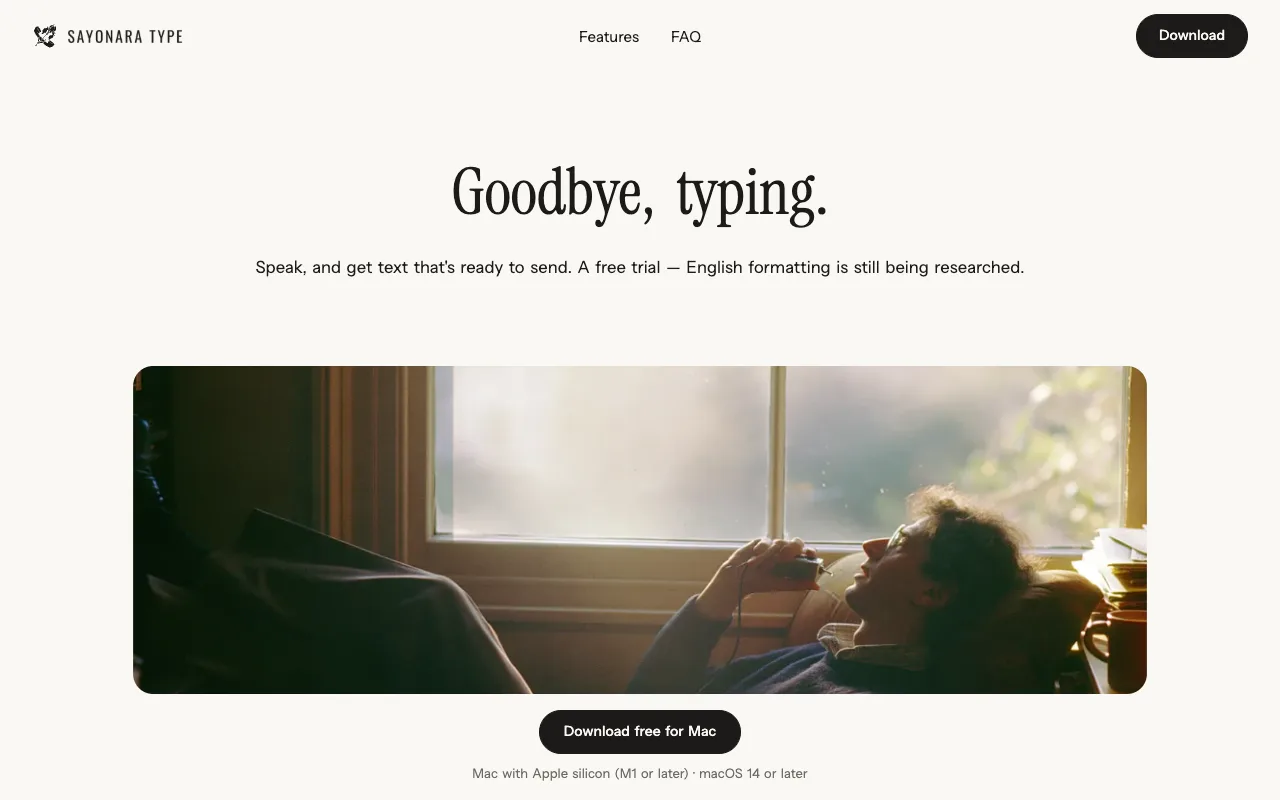
- It limits what it changes: it cleans up filler words, restarts, punctuation and line breaks, number formatting and how sentences connect, and is built to keep your meaning and tone as you said them. It doesn't add things you didn't say
- English is still in research: you can speak in English and 12 other languages besides Japanese, but how well it formats them is still being researched
- Free to try: about 15 minutes of speech a week, resetting weekly, with no credit card. The paid plan is currently available only in Japan
- Data: we don't store your audio or text on our servers, and we process it with settings that keep it out of AI training (processing is in the cloud)
- How it differs from Typeless: rather than rewriting your wording, it aims to keep your own words and make them ready to send
It currently runs only on Apple silicon Macs (M1 or later, macOS 14 or later). Windows and Intel Macs are in preparation (as stated on our official site).
To pay less than Typeless: Aqua Voice, Wispr Flow, Willow
Aqua Voice
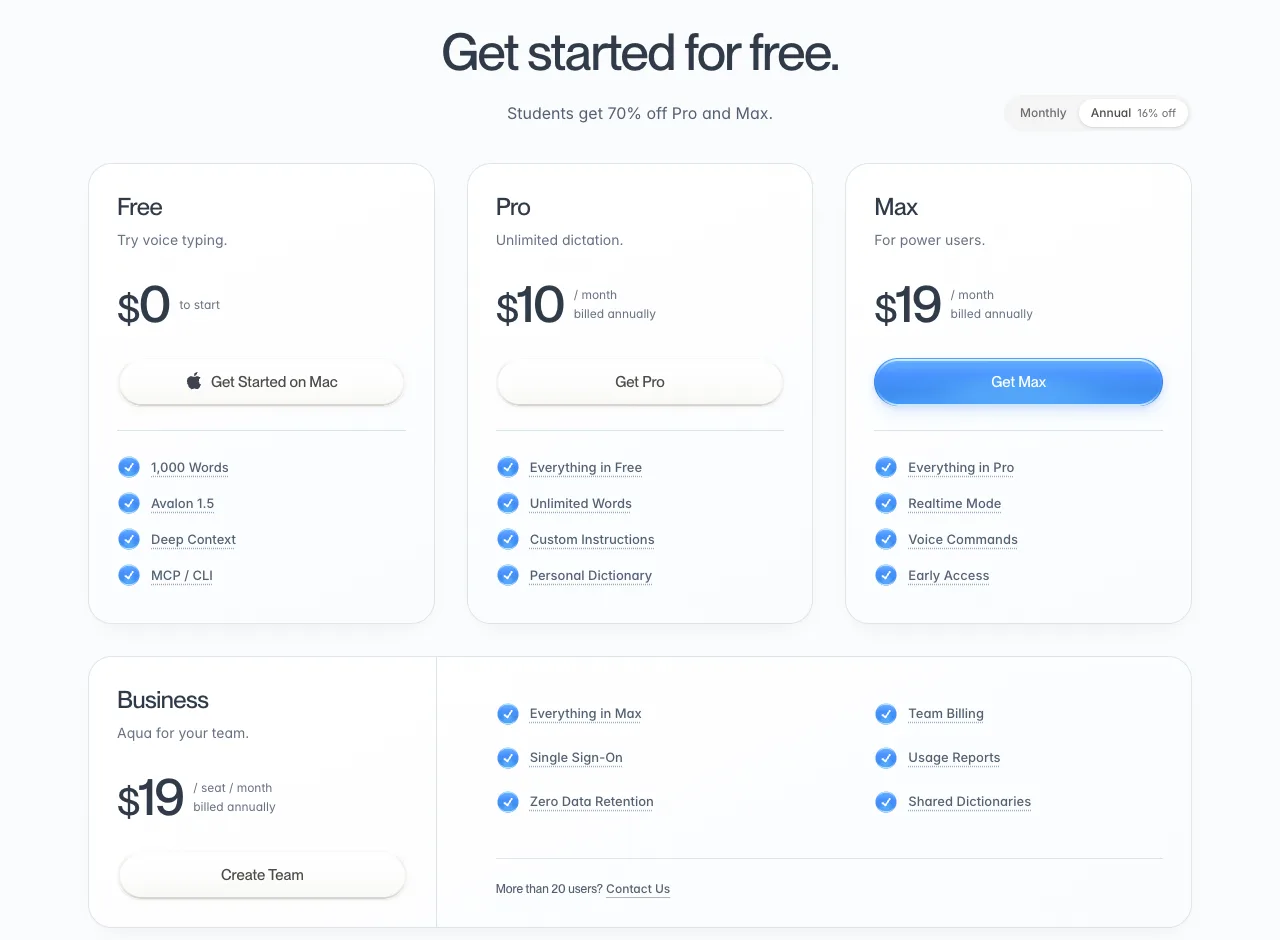
Pro, in the middle, is $10 a month billed annually. Switch the toggle at the top right to monthly and it's $12 a month. The Free column says "1,000 Words": you can use up to 1,000 words in total for free.
- Price: Pro is $12 a month billed monthly ($10 a month billed annually). Max is $24 a month billed monthly ($19 a month billed annually)
- Languages: its FAQ names English, Spanish, French, German, Japanese, Mandarin, Arabic "and more"
- Processing: cloud. Offline availability depends on platform and mode
- How it differs from Typeless: billed monthly, it's less than half the price. Custom Instructions let you tell it how to format
For a closer look at these two, see “Typeless vs Aqua Voice”.
 Read nextTypeless vs Aqua Voice: price, privacy and which to chooseTwo dictation apps that often come up together, compared using only what their official pages say. The question isn't which one is better, but which one suits whom, within the facts we could confirm.
Wispr Flow
In the US, Pro is $15 a month, or $12 a month billed annually. Unlike the other options, prices are set per region in 24 currencies, and its help center says the price shown is what you're charged, with no tax added on top.
- Price: Pro is $15 a month in the US billed monthly ($12 a month billed annually); fixed local prices elsewhere
- Free: up to 2,000 words a week on desktop. Works in any app
- Languages: English is in its supported-language list ("100+ languages" in its help)
- Data: a setting controls whether data is stored on its servers. Used for training only if you opt in
- How it differs from Typeless: the price you see is the price you pay, in your local currency. It also says it learns your names and jargon
Willow
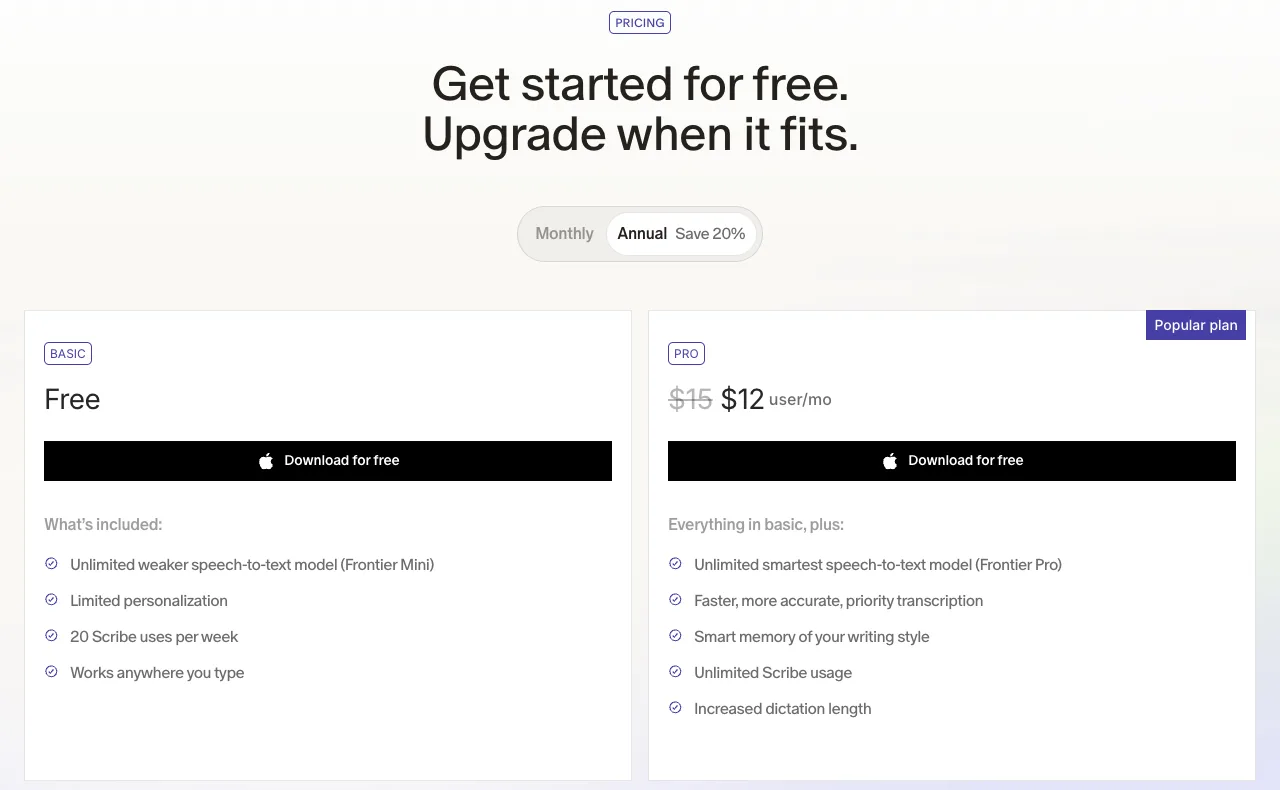
In the Pro column on the right, $15 is struck through and replaced with $12: the annual plan is shown as 20% off. The first line in the Free column reads "Unlimited weaker speech-to-text model," so the weaker model has no usage cap even for free.
- Price: Pro is $15 a month billed monthly ($12 a month billed annually)
- Data: Private Mode is on by default, and dictated text isn't collected
- Languages: "over 100 languages"
- How it differs from Typeless: even on the free plan, the lighter model has no word limit
To keep audio on your Mac: Superwhisper, Spokenly, VoiceInk
With tools that process locally, your audio stays on your Mac. The trade-off is that the heavy work of recognition and formatting runs on your own Mac. We explain the limits in “Is local dictation safer?”
 Read nextIs local AI dictation safer? Local vs cloud and their limitsProcessing your voice locally, so it never leaves your Mac, is a reassuring choice. But a Mac's computing power is limited, and that shows up in how well it hears you and how well it cleans up your text. And if you use a cloud tool, what should you check to use it with confidence? We lay out the limits of both.
Superwhisper
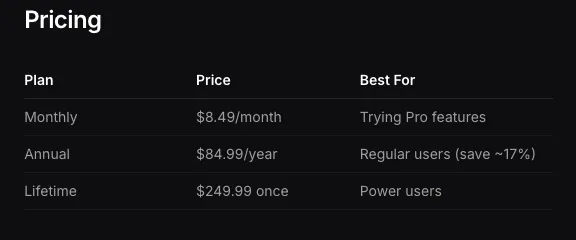
There are three ways to pay, and you can pay once with Lifetime ($249.99).
| How you pay | Price |
|---|---|
| Monthly | $8.49 |
| Annually | $84.99 (about $7.08 a month) |
| Lifetime | $249.99 (one time) |
- Free: unlimited with local Whisper models
- Processing: local and cloud. With local models, neither audio nor text leaves your Mac (per its privacy policy; if a mode uses a cloud AI model, the text goes to that provider)
- Note: it recommends cloud models on Intel Macs
- How it differs from Typeless: you can create your own "modes" (Email, Message and so on) to format differently for each
Spokenly
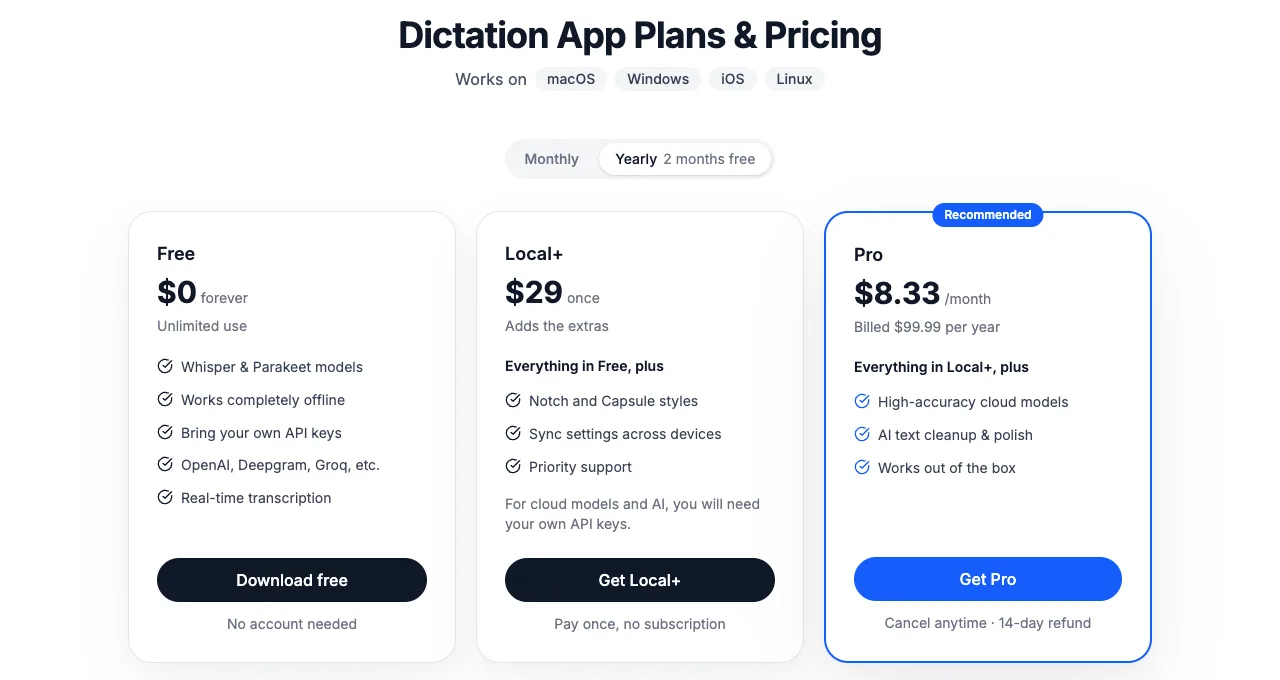
The three columns run left to right from "local only" to "add features with a one-time purchase" to "use the cloud too."
- Free ($0): unlimited with local models. No account needed
- Local+ ($29, one time): adds appearance settings and sync across devices. To use the cloud, you need your own API key
- Pro ($8.33 a month billed annually, $9.99 billed monthly): adds cloud models and AI text editing
How it differs from Typeless: you can keep using it locally without paying. But formatting (AI text editing) requires Pro or your own API key.
VoiceInk
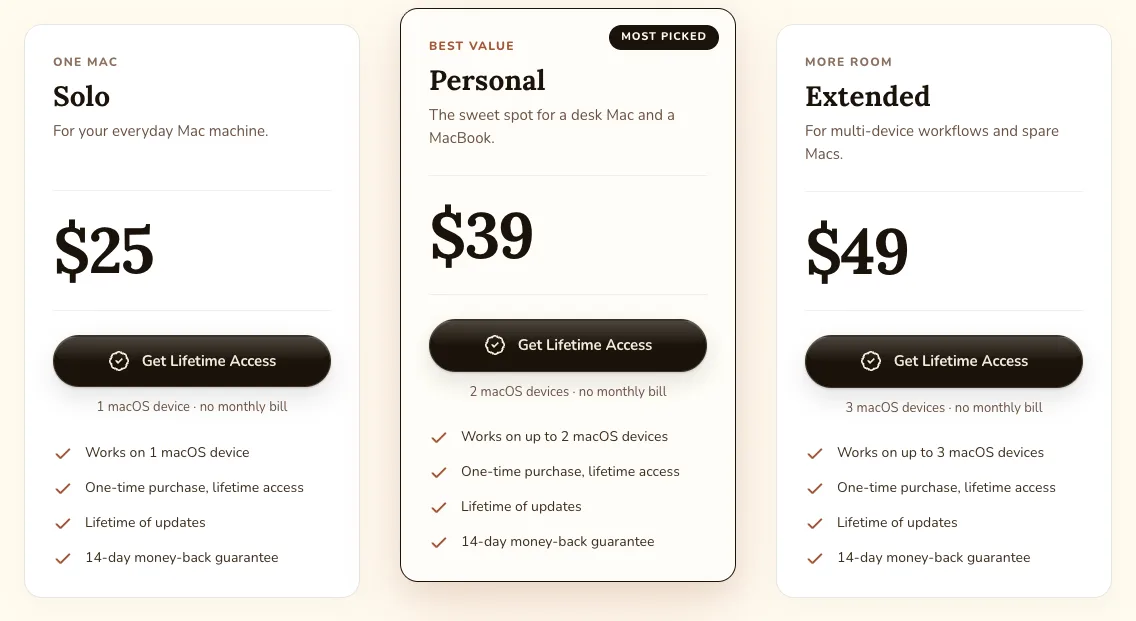
The three columns differ only in how many Macs you can use. All say "no monthly bill," so there's no monthly fee.
| Macs | Price (one time) |
|---|---|
| 1 | $25 |
| 2 | $39 |
| 3 | $49 |
- Processing: local by default. Even when its formatting uses the cloud, only text is sent, not your voice
- Requirements: Apple silicon Mac, macOS 14.4 or later, 8GB of memory or more recommended
- How it differs from Typeless: no monthly fee, and the code is public (open source)
Mac's built-in dictation
At no extra cost, it can process English on your Mac and add punctuation automatically. Apple's official help doesn't describe removing filler words. See “How to use dictation on Mac”.
 Read nextHow to use dictation on Mac: setup, punctuation and limitsYour Mac already has dictation built in, at no extra cost. Here's how to turn it on, how punctuation works, and how to switch languages, following Apple's official help. We also cover where the built-in feature falls short.
If you're unsure, dictate your own text within the free tiers and compare
- Keep costs around $10 a monthAqua Voice, Superwhisper, Spokenly
- Pay exactly the price you see, in your currencyWispr Flow (fixed local prices, no tax added)
- Limit how much it rephrasesSayonaraType (ours; English formatting in research), Aqua Voice (Custom Instructions)
- Keep audio on your MacVoiceInk, Superwhisper, Spokenly (with local models)
- Try without spending anythingMac's built-in dictation
Every option has something you can try for free. Before switching, dictate the kinds of text you actually write (email, chat, notes) the same way in each, and compare the results.
For a table of 12 apps on the same points, including ones not listed here, see “12 voice dictation apps for Mac, compared”.
 Read nextMac dictation apps: 12 compared and ranked (October 2026)You want what you say to come out as text you can send. If that's why you're choosing a dictation app for Mac, four things matter most. We checked those four points for 12 apps using only what each company's official pages say. This article does not compare how well they hear you or how well they clean up your speech.
SayonaraType
A voice input app for Mac. Free to try — formatting for English is still being researched.
How we checked
We checked each company's pricing page, help pages and privacy policy on 2026-10-25 and took screenshots of the pricing pages. Prices are in US dollars unless noted. We did not measure recognition or formatting quality.
Sources
- Aqua Voice pricing (aquavoice.com/pricing), checked 2026-10-25
- Wispr Flow pricing (wisprflow.ai/pricing), data controls (wisprflow.ai/data-controls) and help center (docs.wisprflow.ai), checked 2026-10-25
- Willow pricing (willowvoice.com/pricing) and data handling (help.willowvoice.com), checked 2026-10-25
- Superwhisper pricing (superwhisper.com/docs/billing/plans) and privacy (superwhisper.com/privacy), checked 2026-10-25
- Spokenly pricing (spokenly.app/pricing) and privacy (spokenly.app/privacy), checked 2026-10-25
- VoiceInk (tryvoiceink.com), checked 2026-10-25
- Apple, "Use Dictation on Mac" (support.apple.com), checked 2026-10-23
- SayonaraType (sayonaratype.com/en/), checked 2026-10-26