

We record prices the same way every month, with screenshots
The common problem with pricing comparisons is that you can't tell when the prices are from. So this table follows a few rules:
- Open the official pricing page and record prices exactly as shown
- Keep a screenshot (with the date)
- Re-check the same way every month, and note any changes under "this month's changes"
On tax, only Wispr Flow states in its help center that the price shown is the amount charged, with no VAT or sales tax added (details in “our Wispr Flow review”). The other products didn't say. If you pay in a currency other than the one shown, exchange rates and card fees may apply.
 Read nextWispr Flow review (2026): pros, cons, pricing and privacyWispr Flow has far more US App Store ratings than the other dictation apps we compared (as of 2026-10-25). Its accuracy gets high marks, yet some users leave over how it handles data. Its prices are also set per region. We put public reviews side by side with screenshots of its official help pages.
This month: Aqua Voice changed its prices, and Wispr Flow showed local currency
Checking twice, on 2026-10-23 and 2026-10-25, we found two differences:
- Aqua Voice raised Pro: billed monthly went from $10 to $12, and the per-month annual rate from $8 to $10. Max went the other way: $30 to $24 billed monthly, and $24 to $19 per month billed annually
- Wispr Flow showed yen: on 10-23 we saw US dollars (Pro $15 a month), but on 10-25, opened from Japan, it showed yen. Its help center explains that the currency is set by the region you connect from, with fixed prices in 24 currencies, so this is regional pricing rather than a price change
Everything else was the same both times.
Three pricing models: free, subscription and one-time purchase (2026-10-25)
| Product | Free use | Billed monthly | Billed annually (per month) | One-time |
|---|---|---|---|---|
| Typeless | Weekly word limit (number not stated) | Pro $30 | Pro $12 | — |
| Aqua Voice | 1,000 words in total | Pro $12, Max $24 | Pro $10, Max $19 | — |
| Wispr Flow (US) | 2,000 words a week on desktop | Pro $15 | Pro $12 | — |
| Willow | Weaker model unlimited | Pro $15 | Pro $12 | — |
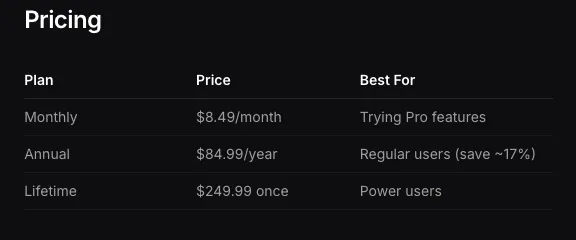
| Superwhisper | Local models unlimited | Pro $8.49 | Pro about $7.08 ($84.99 a year) | Lifetime $249.99 |
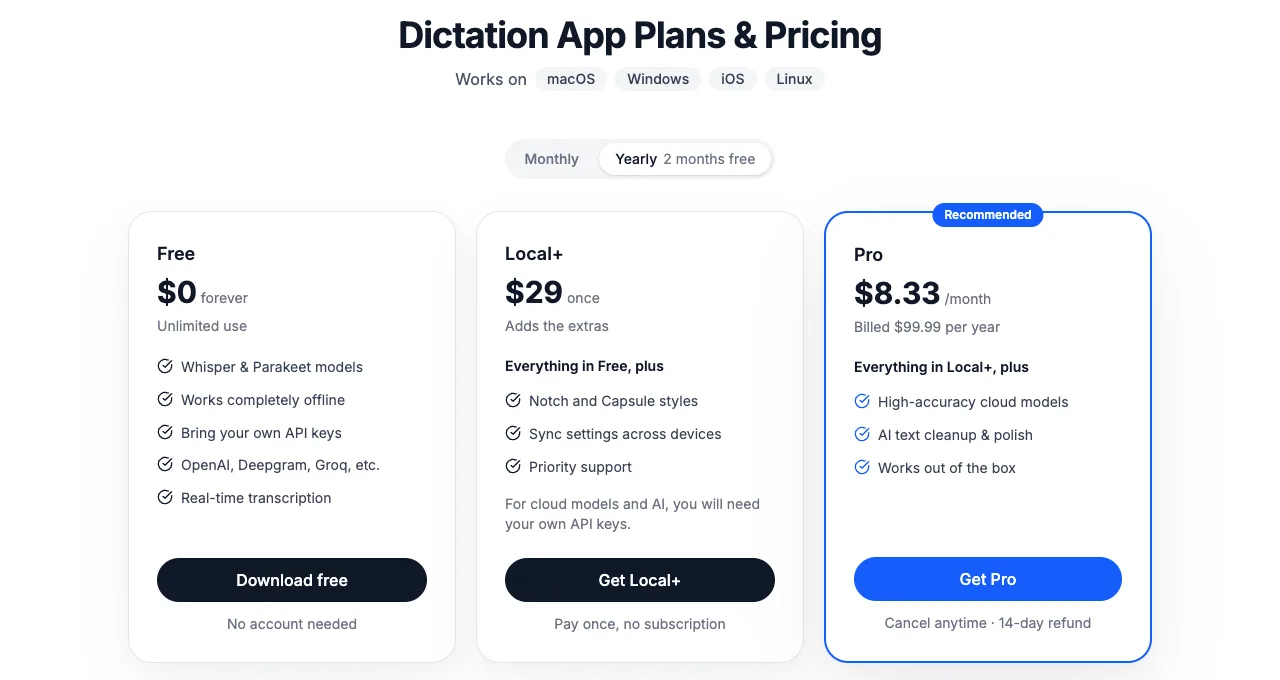
| Spokenly | Local models unlimited | Pro $9.99 | Pro $8.33 ($99.99 a year) | Local+ $29 |
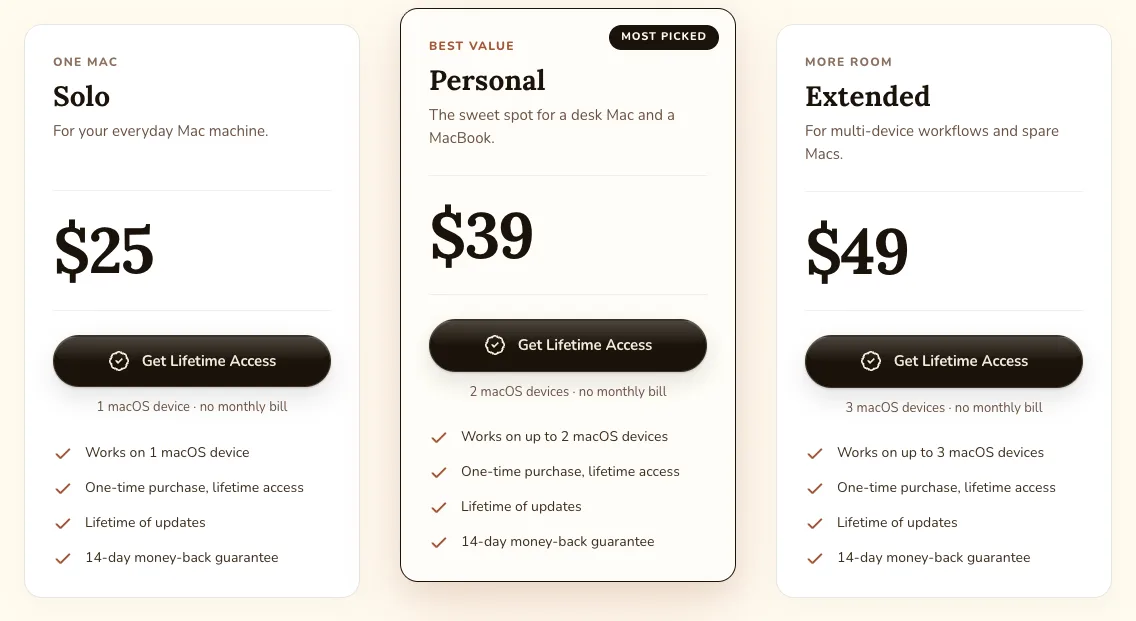
| VoiceInk | Not confirmed | — | — | $25 (1 Mac) to $49 (3 Macs) |
| MacWhisper | Free (€0) | — | — | Pro €64 |
| Speechify Voice Typing | Free | — | — | — |
| Mac built-in dictation | Free (included in macOS) | — | — | — |
| SayonaraType (ours) | Free to try (about 15 min of speech a week) | Paid plan available only in Japan | — | — |
Billed monthly, Typeless is the most expensive; annual billing narrows the gap
Here are the monthly Pro prices of the products priced in US dollars.
Typeless, the most expensive, costs more than three times as much as Superwhisper, the cheapest. Annual billing narrows the gap, though.
| Product | Monthly | Annual (per month) | Discount for annual |
|---|---|---|---|
| Typeless | $30 | $12 | 60% |
| Wispr Flow (US) | $15 | $12 | 20% |
| Willow | $15 | $12 | 20% |
| Aqua Voice | $12 | $10 | about 17% |
| Spokenly | $9.99 | $8.33 | about 17% |
| Superwhisper | $8.49 | about $7.08 | about 17% |
Only Typeless has an extreme gap between monthly and annual billing. If you plan to keep using a tool, compare annual prices; if you're trying it out, compare monthly prices. That's closer to what you'll actually pay.
To avoid a monthly fee, go one-time purchase or local models
There are two ways to avoid a monthly fee:
- One-time purchase: VoiceInk (from $25), Spokenly Local+ ($29), MacWhisper Pro (€64), Superwhisper Lifetime ($249.99)
- Stay free: Superwhisper and Spokenly with local models, Mac's built-in dictation, Speechify Voice Typing (Local here means your audio is turned into text on your Mac instead of being sent over the internet; features such as formatting, sync or logs may still go online, so check each tool.)
One-time purchases and local models are mostly tools that process audio on your Mac. Accuracy and wait times depend on your Mac's hardware. We cover this in “Is local dictation safer?”
 Read nextIs local AI dictation safer? Local vs cloud and their limitsProcessing your voice locally, so it never leaves your Mac, is a reassuring choice. But a Mac's computing power is limited, and that shows up in how well it hears you and how well it cleans up your text. And if you use a cloud tool, what should you check to use it with confidence? We lay out the limits of both.
The big number on a pricing page is usually the per-month price when billed annually
Here are the screenshots we checked.
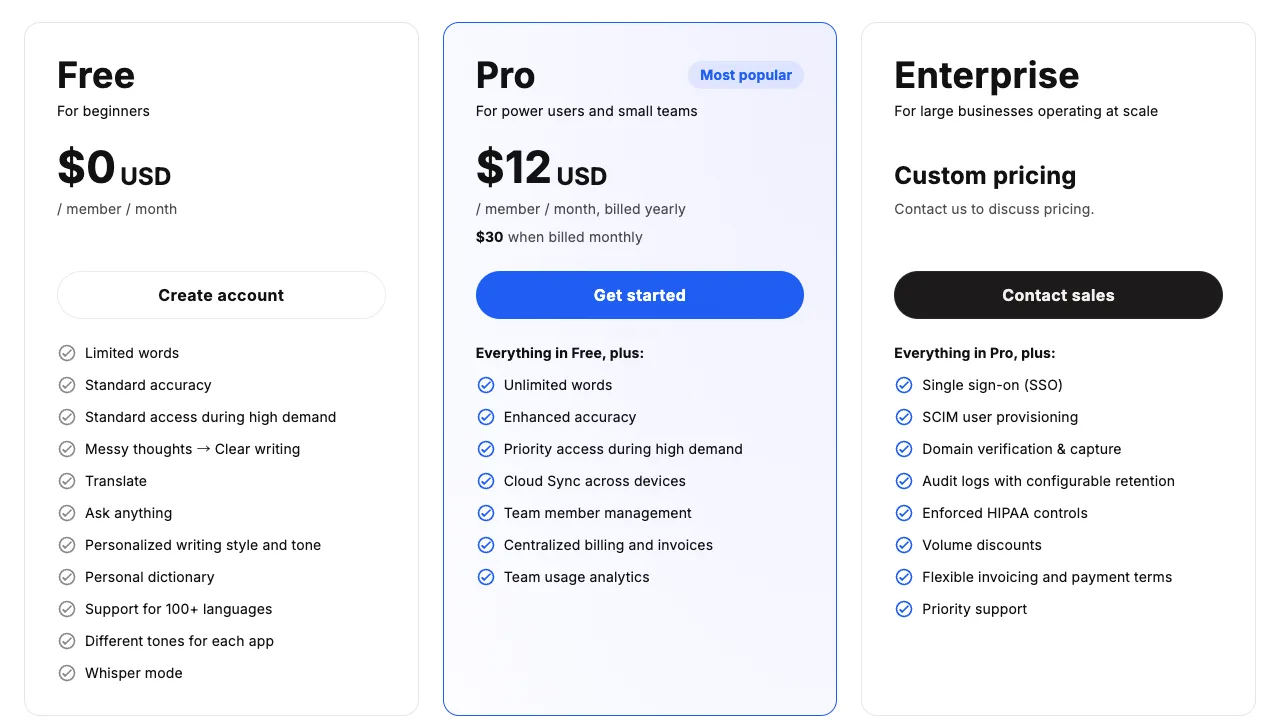
The large $12 is the per-month rate billed yearly; the price billed monthly is the "$30" in small type below it.
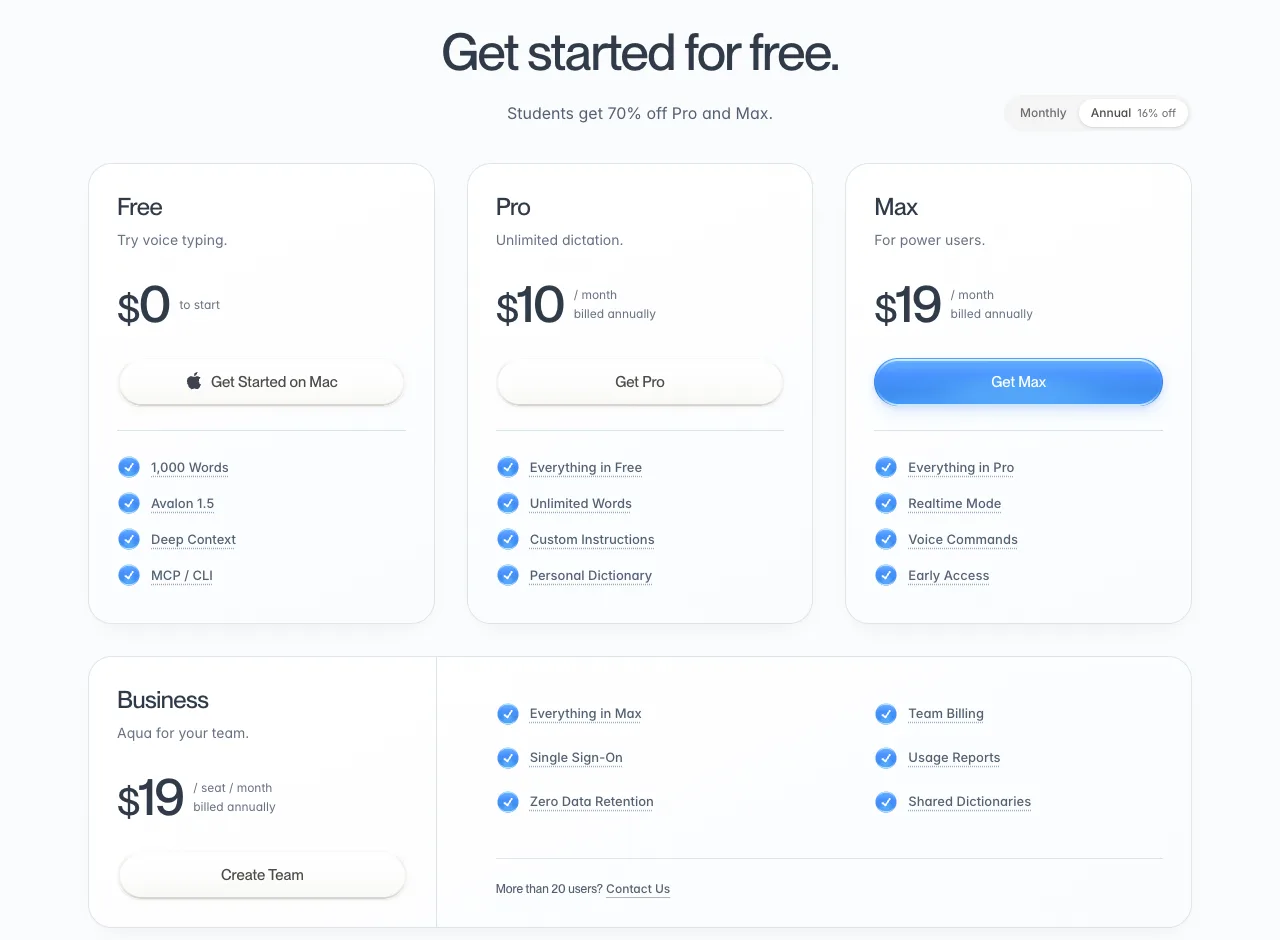
The default view is billed annually, shown per month: Pro shows $10 and Max $19.
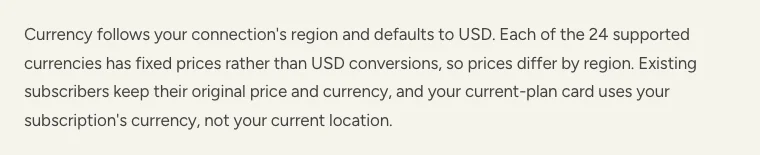
Wispr Flow's pricing page shows the currency of the region you connect from. The help center says prices are fixed in 24 currencies, and existing subscribers keep the price and currency they signed up with. Opened from Japan, the page showed yen with a Japanese flag next to the price.
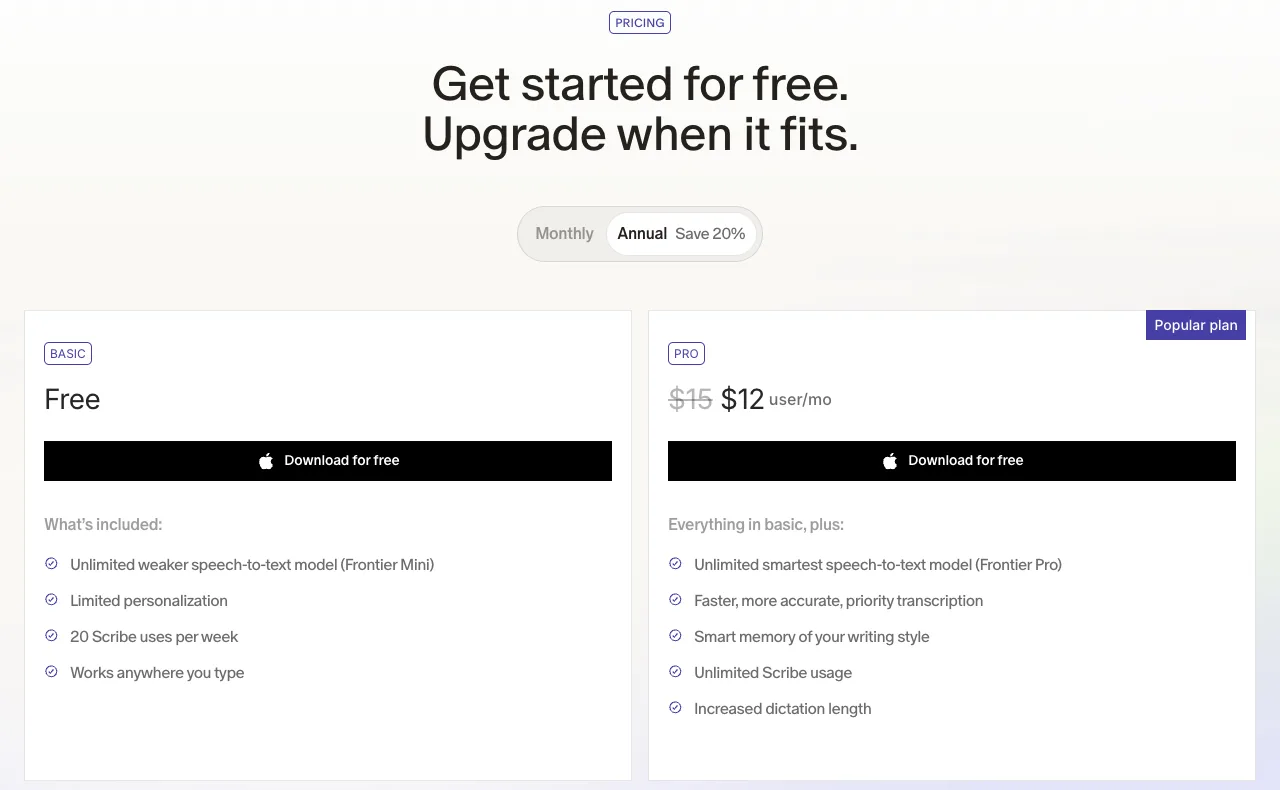
Pro shows $15 struck through, then $12: the 20% annual discount.
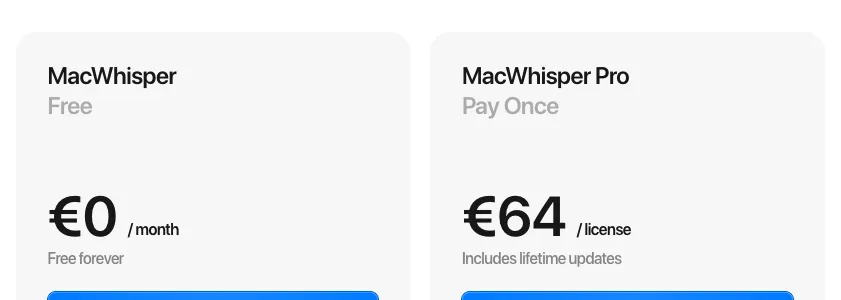
MacWhisper is priced in euros, and Pro is a one-time payment that includes lifetime updates.
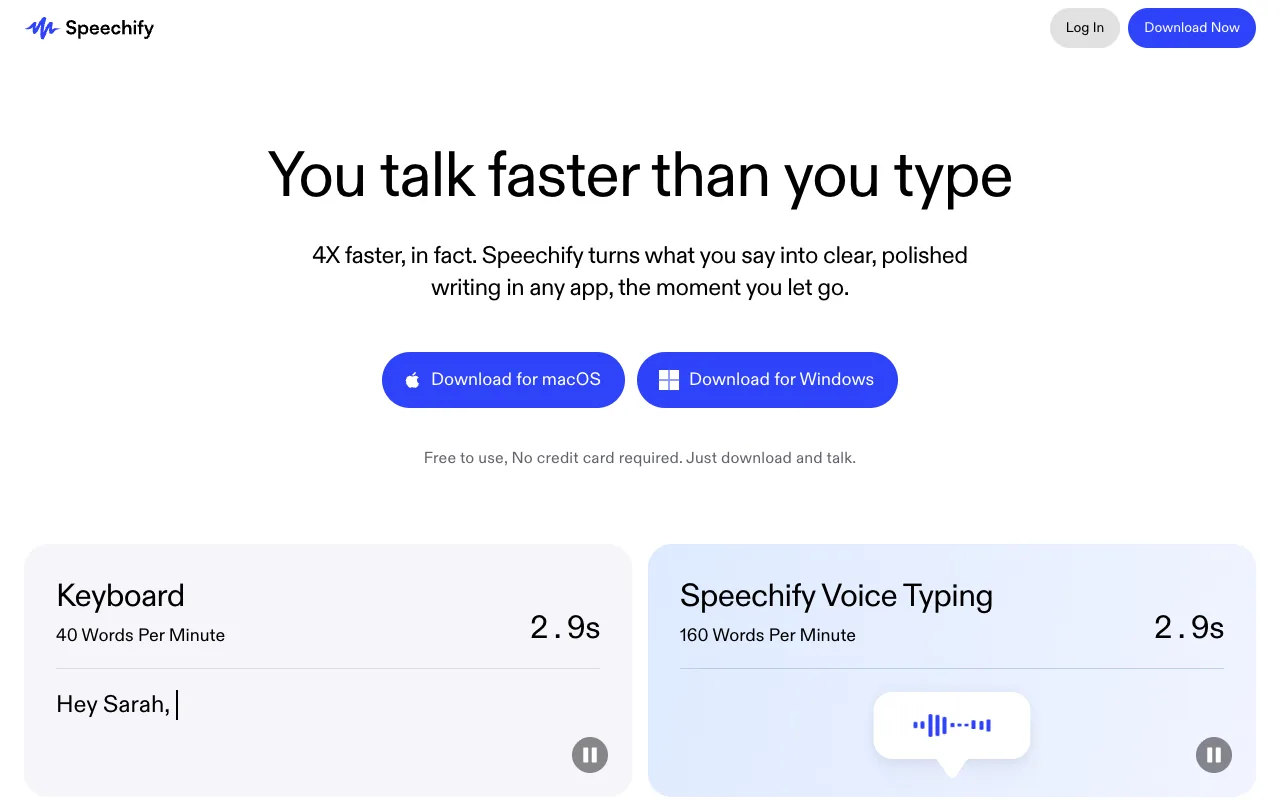
Below the button it says "Free to use, No credit card required."
SayonaraType (ours) is free to try: about 15 minutes of speech a week, resetting weekly, with no credit card. The paid plan is currently available only in Japan.
We'll re-check in November 2026
Next, we'll re-check the same way in November 2026. For how these apps differ beyond price, see “12 voice dictation apps for Mac, compared”. If you're looking for options by reason for leaving Typeless, see “Alternatives to Typeless”.
 Read nextMac dictation apps: 12 compared and ranked (October 2026)You want what you say to come out as text you can send. If that's why you're choosing a dictation app for Mac, four things matter most. We checked those four points for 12 apps using only what each company's official pages say. This article does not compare how well they hear you or how well they clean up your speech.
 Read nextTypeless alternatives: 8 dictation apps, by reason to switchToo expensive, rephrases too much, or you don't want your audio leaving your Mac. People switch from Typeless for different reasons, and the right replacement changes with the reason. We set out what to look at for each reason and lined up 8 options alongside screenshots of their pricing pages.
SayonaraType
A voice input app for Mac. Free to try — formatting for English is still being researched.
How we checked
On 2026-10-25 we opened each company's official pricing page, recorded the prices exactly as shown and took screenshots. We also checked the same pages on 2026-10-23 and describe the differences under "this month's changes." Prices are in US dollars unless noted, and exclude taxes and card fees. Because we checked from Japan, Wispr Flow showed yen; we list its US price from its pricing page and help center.
Sources
- Each company's official pricing page (URLs under each screenshot), checked 2026-10-23 and 2026-10-25
- Wispr Flow help center, "Flow plans and what's included" and "VAT, GST & tax on Wispr Flow invoices" (docs.wisprflow.ai), checked 2026-10-25