

With local processing, your audio never leaves your Mac
Dictation tools come in two basic designs. Some turn your voice into text on your own Mac (local). Others send it to the company's servers and turn it into text there (cloud).
Local here means your audio is turned into text on your Mac instead of being sent over the internet. Features such as formatting, sync or logs may still go online, so check each tool. Cloud means your audio is sent over the internet to the company's servers and turned into text there.
- 1SpeakYour Mac's microphone picks up your voice
- 2Transcribe on the MacHow large a model you can run depends on your Mac's memory and speed
- 3Clean up on the MacDepends on the tool. It's heavy work, so how much is possible depends on your Mac
- 4Text appears in the fieldYour audio never leaves the Mac
- 1SpeakYour Mac's microphone picks up your voice
- 2Send to the company's serversNeeds a connection
- 3Transcribe and clean up on the serversLarge models can be used
- 4Text appears in the fieldWhether it's stored or used for training depends on the company's policy
With local processing, your audio stays on your Mac, and it works without a connection. If you're dictating the details of a work meeting, or drafts you don't want anyone to see, the fact that your audio never leaves is itself the reason to feel safe.
But local processing is bound by your Mac's hardware
Local processing has limits.
Speech-to-text models tend to be more accurate the larger they are. But how large a model your Mac can run depends on its memory and processing speed. A larger model tends to mean longer waits; a smaller one tends to mean more recognition errors.
Cleaning up spoken language is even heavier work. Removing filler words, merging restarts into one sentence, and adding punctuation and line breaks all require understanding what the sentence means. Here too, there's a limit to what a Mac can run.
The companies' own descriptions reflect this. Superwhisper, for example, says Intel Macs work best with cloud models and that offline models run really well only on Apple silicon Macs. VoiceInk recommends at least 8GB of memory.
For cloud tools, check three things: storage, training, and subprocessors
When you choose a cloud tool, check these three things:
| What to check | Where to find it |
|---|---|
| Whether audio and text are stored, and for how long | Privacy policy, data-handling page |
| Whether they're used for AI training, and whether you can choose | Same |
| Whether processing is handed to other companies, and how those companies handle it | The subprocessor section of the privacy policy |
Each company words this differently. Here's what the official pages said as of 2026-10-23:
- Typeless: audio is processed in the cloud and immediately discarded, not stored. Not used for training by Typeless or any third party
- Wispr Flow: a setting controls whether data is stored on its servers. Used for training only if you opt in
- Willow: Private Mode is on by default, and dictated text isn't collected. Used for training only if you opt in
- Superwhisper: with cloud models, processing happens in memory and nothing is stored after the request. Not used for training
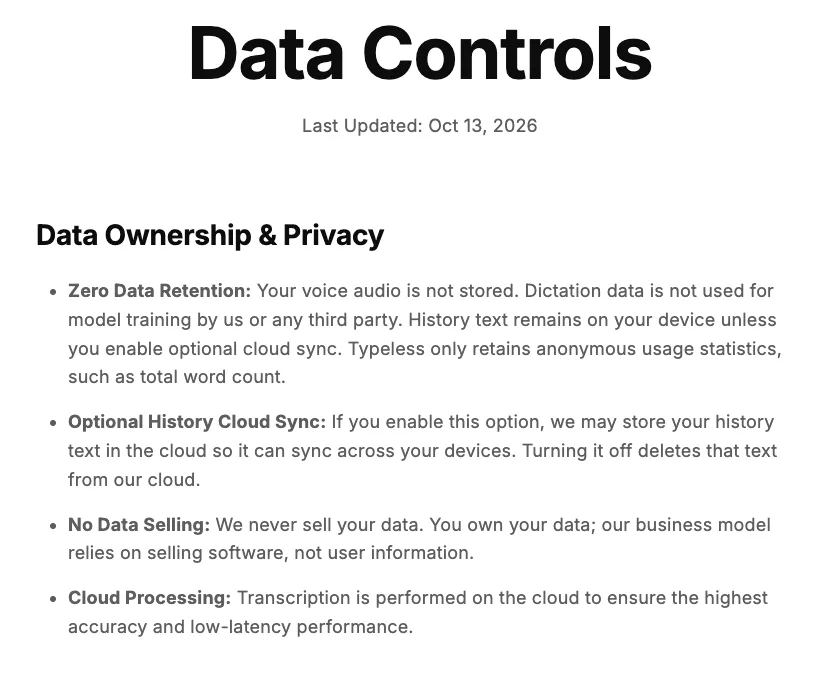
On this page, the items from the table above are here:
- Storage and training → the first item, "Zero Data Retention"
- Where processing happens → the fourth item, "Cloud Processing" (in the cloud)
Even when a page says "not stored," an outside company that does the processing may keep data for a period under its own policy. Whether a company says so too is worth checking.
If audio must stay on your Mac, go local; if you want polished text, the cloud
If you don't want your audio to leave your Mac at all, local processing is the sure choice. Then try it on your own Mac to see whether the accuracy and the wait are acceptable. The dictation built into your Mac can also process English locally; see “How to use dictation on Mac”.
 Read nextHow to use dictation on Mac: setup, punctuation and limitsYour Mac already has dictation built in, at no extra cost. Here's how to turn it on, how punctuation works, and how to switch languages, following Apple's official help. We also cover where the built-in feature falls short.
If you want spoken language cleaned up into text you can send as is, cloud tools will often have the edge given what Macs can run today. In that case, check the three things above on the official pages before you choose, and you can keep using it with confidence. How each company processes speech is in the "Processing" column of “12 voice dictation apps for Mac, compared”.
 Read nextMac dictation apps: 12 compared and ranked (October 2026)You want what you say to come out as text you can send. If that's why you're choosing a dictation app for Mac, four things matter most. We checked those four points for 12 apps using only what each company's official pages say. This article does not compare how well they hear you or how well they clean up your speech.
SayonaraType processes speech in the cloud. We don't store your audio or text on our servers, and we process it with settings that keep it out of AI training. Processing is done on our service providers' servers, and those providers may keep data for a limited period under their own policies. Details are in our Privacy Policy.
SayonaraType
A voice input app for Mac. Free to try — formatting for English is still being researched.
How we checked
Based on each company's privacy policy and data-handling page (checked 2026-10-23) and on how speech recognition generally works. We did not measure the accuracy of any specific product.
Sources
- Superwhisper privacy (superwhisper.com/privacy), checked 2026-10-23
- VoiceInk (tryvoiceink.com), checked 2026-10-23
- Typeless data controls (typeless.com/data-controls), checked 2026-10-23
- Wispr Flow data controls (wisprflow.ai/data-controls), checked 2026-10-23
- Willow data and privacy (help.willowvoice.com), checked 2026-10-23
- Apple, "Use Dictation on Mac" (support.apple.com/guide/mac-help/mh40584/mac), checked 2026-10-23