

We compared four points, using only what each official page says
Dictation apps have multiplied over the past year. Yet when you read comparison articles, it's often unclear where each number came from. So in this article we used only what each company states on its official pages.
We looked at four points.
| Point | What we checked |
|---|---|
| English | Whether the official pages show the product works in English6 |
| Formatting | Whether the official pages describe cleaning up speech, such as removing filler words or adding punctuation automatically |
| Anywhere | Whether it types into other apps' text fields: email, chat, documents |
| Free to try | Whether you can try it before paying |
We ranked the products by how many of the four points we could confirm on official pages. "Not confirmed" does not mean the feature is missing. It means the official pages didn't say so. We did not measure recognition accuracy or how readable the cleaned-up text is, so the ranking is not a ranking of quality1.
All 12 work in English, so the differences come down to the other three points
Prices are as shown on the official pages (checked 2026-10-25), in US dollars unless noted. Wispr Flow sets a fixed price per region, so what you see depends on where you open the page5.
| Product | English | Formatting | Anywhere | Free to try | Paid (billed monthly) | Processing |
|---|---|---|---|---|---|---|
| Typeless | Yes | Yes | Yes | Yes (weekly word limit) | Pro $30 ($12/mo billed annually) | Cloud |
| Willow | Yes | Yes | Yes | Yes | Pro $15 ($12/mo billed annually) | Mostly cloud |
| Speechify Voice Typing | Yes | Yes | Yes | Yes (free) | Free | Local and cloud |
| Mac dictation (built in) | Yes | Yes2 | Yes | Yes (free, built in) | Free | Local |
| SayonaraType (ours) | Yes | In research | Yes | Yes (about 15 min of speech a week) | Paid plan available only in Japan | Cloud |
| Aqua Voice | Yes | Not confirmed | Yes | Yes (1,000 words) | Pro $12 ($10/mo billed annually) | Cloud |
| Wispr Flow | Yes | Not confirmed | Yes | Yes (2,000 words a week) | Pro $15 ($12/mo billed annually)5 | Not confirmed |
| Superwhisper | Yes | Not confirmed | Yes | Yes (local models) | Pro $8.493 | Local and cloud |
| VoiceInk | Yes | Yes | Yes | Not confirmed | One-time $25–$49 | Local |
| MacWhisper | Yes | Not confirmed | Yes | Yes | One-time €64 | Local |
| Spokenly | Yes | Not confirmed | Yes | Yes (local models) | Pro $9.99 | Local and cloud |
| Google Docs voice typing | Yes | Not confirmed | No (inside Docs only) | Yes (free) | Free | Not confirmed |
The "Processing" column shows whether your voice is turned into text on your own Mac or on the company's servers. Neither is simply "safer." Local here means your audio is turned into text on your Mac instead of being sent over the internet; features such as formatting, sync or logs may still go online, so check each tool. We cover the limits of local dictation, and how to check a cloud tool, in “Is local dictation safer?”
 Read nextIs local AI dictation safer? Local vs cloud and their limitsProcessing your voice locally, so it never leaves your Mac, is a reassuring choice. But a Mac's computing power is limited, and that shows up in how well it hears you and how well it cleans up your text. And if you use a cloud tool, what should you check to use it with confidence? We lay out the limits of both.
Outside Japan, SayonaraType is free to try only: there is a weekly allowance, and the paid plan is currently offered only in Japan. Its dot sits in the middle for that reason.
This ranking compares the four points we could confirm on each company's official pages; it is not a ranking of recognition accuracy.
First place goes to the four that meet all four points: Typeless, Willow, Speechify and Mac's built-in dictation
1st (tie): Typeless, Willow, Speechify Voice Typing, Mac dictation (all four)
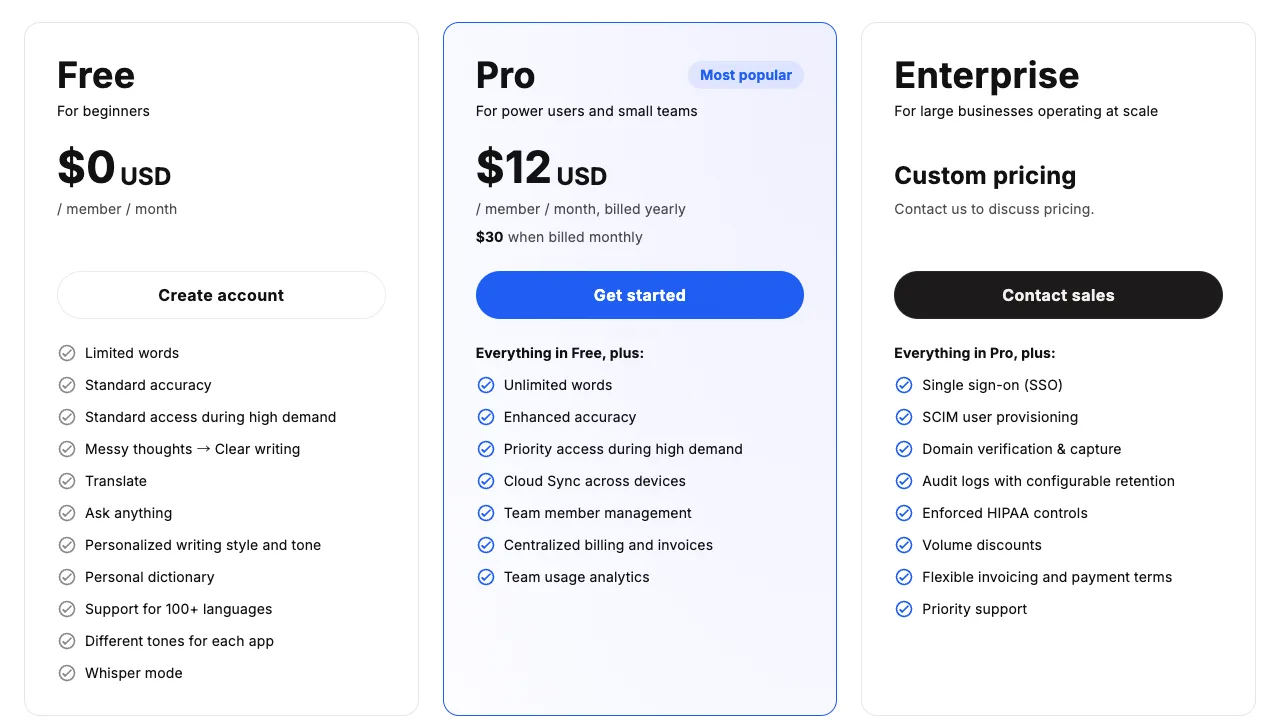
Typeless names filler words among the things it removes. It says audio is processed in the cloud and immediately discarded, and is not used for training4.
The large $12 on the pricing page is the per-month price when billed yearly. Billed monthly, it's $30, which puts it at the high end of this table.
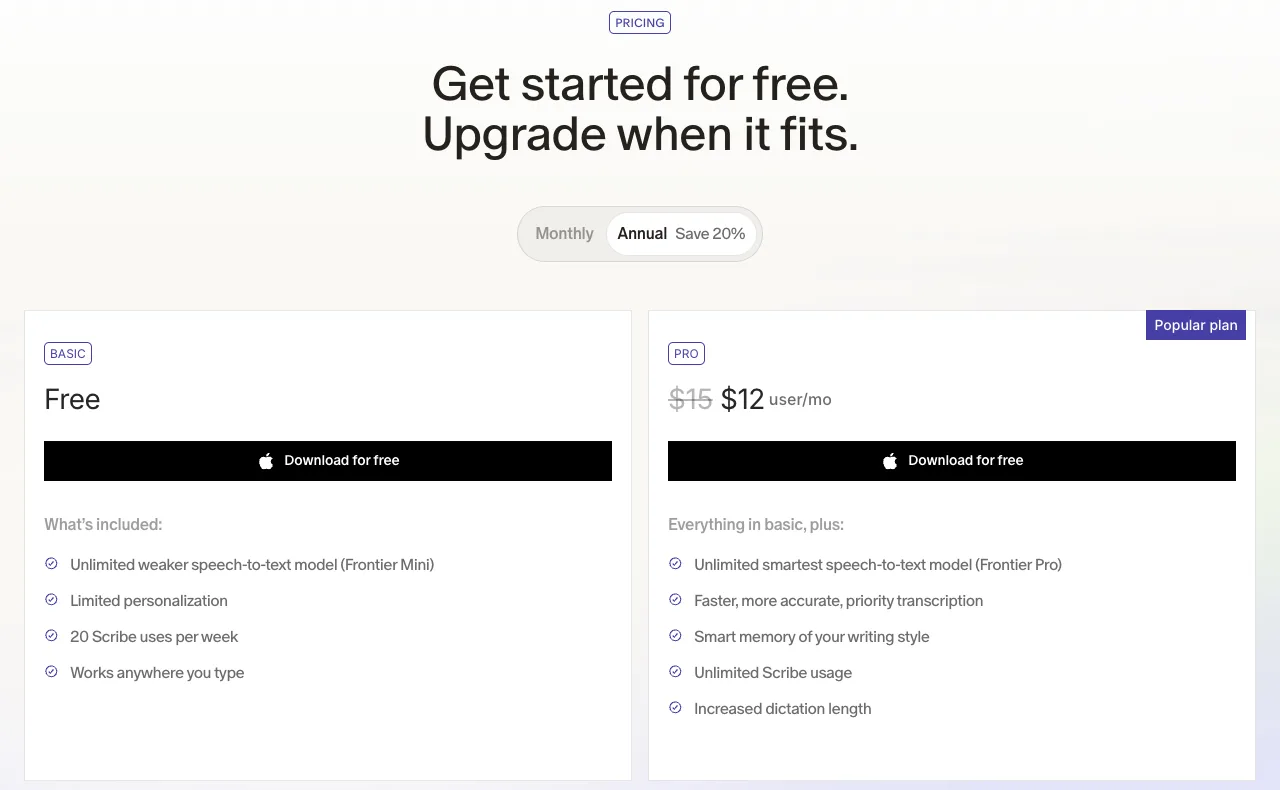
Willow says on its site that it "removes filler words, fixes punctuation, and formats your writing automatically." Pro is $15 a month, or $12 a month billed annually. Its free Basic plan includes unlimited use of the weaker model.
Speechify Voice Typing is free and says that ums, uhs, repeats and false starts "never make it to the page." It also adds punctuation automatically. It runs on macOS 14 or later.
Mac dictation costs nothing extra, and English can be processed on your Mac. Apple's macOS Feature Availability page (checked 2026-10-23) lists English for automatic punctuation. Apple's help does not describe removing filler words, so "formatting" here doesn't mean the same thing as it does for Typeless or Willow.
5th (tie): SayonaraType (ours), Aqua Voice, Wispr Flow, Superwhisper, VoiceInk, MacWhisper, Spokenly (three of four)
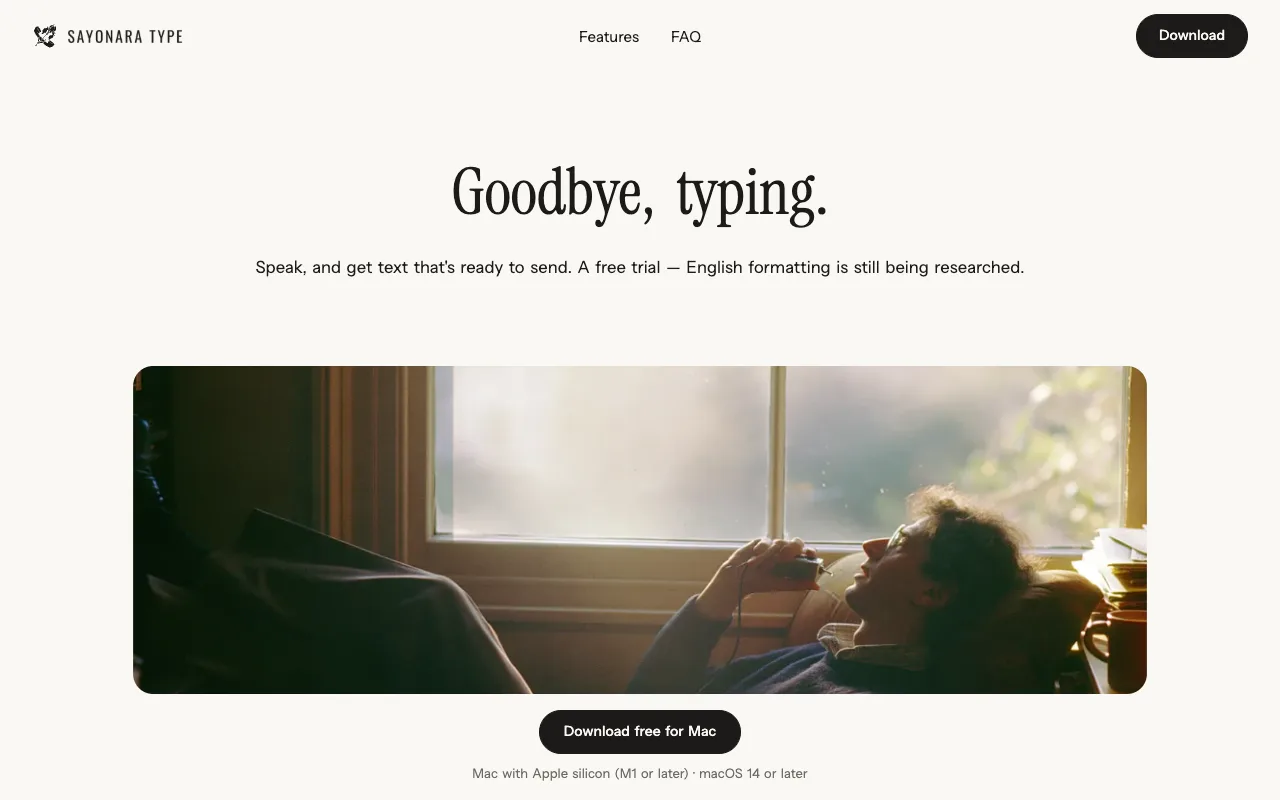
SayonaraType is our own product. Judged on the same four points as the others, it meets three. We did not count "Formatting" for English, because English formatting is still being researched.
- What it's built to do: clean up filler words, restarts, punctuation and line breaks, number formatting and how sentences connect, while keeping your meaning and tone as you said them. It doesn't add things you didn't say. How well this works in English is still being researched
- Languages: besides Japanese, you can speak in 13 languages, including English
- Free to try: about 15 minutes of speech a week, resetting weekly, with no credit card. The paid plan is currently available only in Japan
- Data: we don't store your audio or text on our servers, and we process it with settings that keep it out of AI training. It is processed in the cloud by service providers, who may keep data for a limited period under their own policies
- Mac: Apple silicon (M1 or later) with macOS 14 or later. Windows and Intel Macs are in preparation
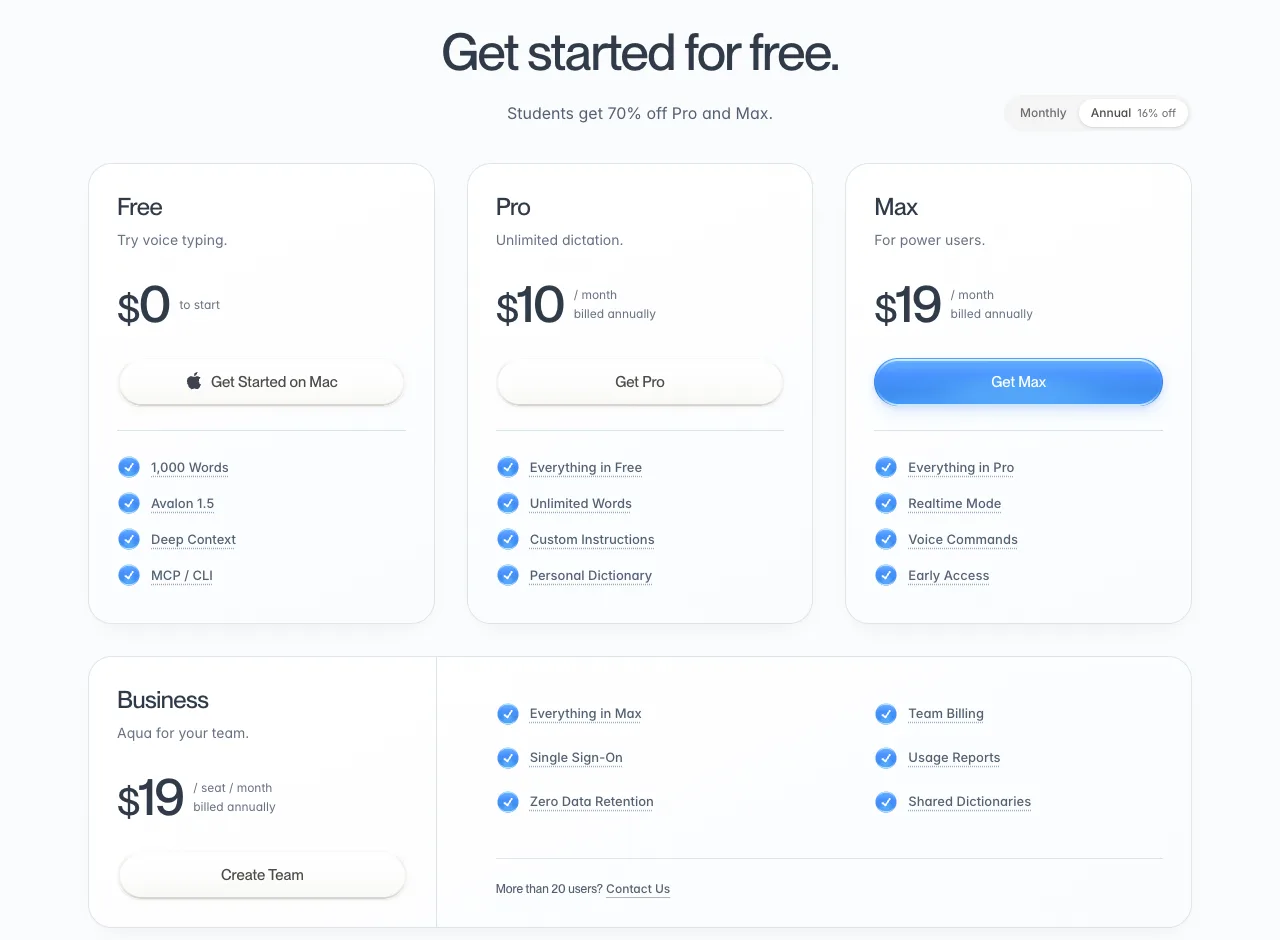
On the Aqua Voice pricing page, the large figure is the per-month price when billed yearly. The price billed monthly appears when you switch the toggle.
| Billed annually (per month) | Billed monthly | |
|---|---|---|
| Aqua Voice Pro | $10 | $12 |
| Wispr Flow Pro (US) | $12 | $15 |
- Aqua Voice: its FAQ names English among supported languages. The free Starter plan is 1,000 words. Its official pages don't describe filler-word removal
- Wispr Flow: English is in its supported-language list. Free use on desktop is 2,000 words a week. Your data is used for training only if you opt in. The pages we checked don't spell out filler-word removal
- Superwhisper, MacWhisper, Spokenly: all three can turn speech into text on your Mac, and all have a free way to use local models (MacWhisper has a free tier). We didn't find a clear statement on cleaning up filler words
- VoiceInk: it does describe removing filler words and repeats, but we couldn't confirm a free tier
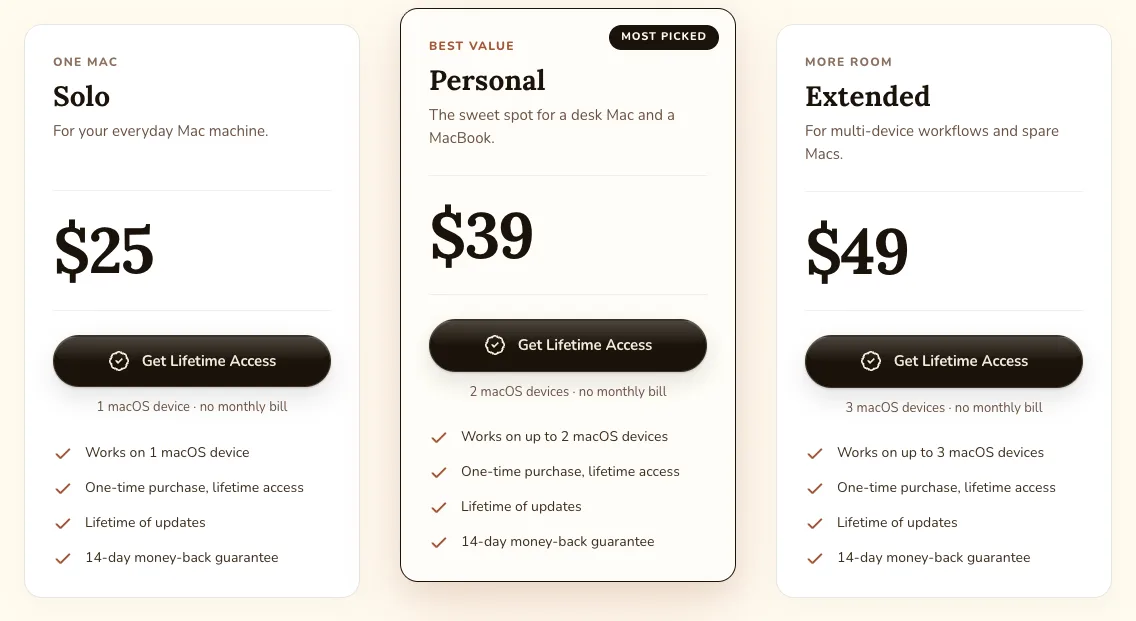
VoiceInk's three options differ only in how many Macs you can use (one to three), and all are one-time purchases with no monthly fee.
The four local tools are strong options if you don't want your audio to leave your Mac. The accuracy of local models depends on your Mac's hardware, so it's worth trying before you decide.
If you're torn between Typeless and Aqua Voice, see “Typeless vs Aqua Voice”.
 Read nextTypeless vs Aqua Voice: price, privacy and which to chooseTwo dictation apps that often come up together, compared using only what their official pages say. The question isn't which one is better, but which one suits whom, within the facts we could confirm.
12th: Google Docs voice typing (two of four)
Google Docs voice typing supports English and is free. But it only works inside Google Docs and Slides, so it can't type straight into email or chat. You also have to say punctuation out loud, such as "comma" or "period."
Once you know your goal, the list gets short
- Try for free first: the dictation built into your Mac is the easiest place to start. Setup and where it falls short are in How to use dictation on Mac
- Keep audio off the internet: Superwhisper, VoiceInk, MacWhisper, Spokenly (with local models), or Mac dictation
- Turn speech into text you can send: Typeless, Willow, Speechify and VoiceInk all describe formatting on their official pages. If you'd rather keep your own wording, compare how much each one rewrites before you choose
- Use it beyond the Mac: Typeless, Aqua Voice, Wispr Flow and Willow also run on Windows and iPhone
Watch for annual billing: the big number is often a per-month price billed annually
Many pricing pages show the per-month price for annual billing in large type. That looks cheaper, but you pay 12 months up front. In the table above we separated monthly and annual prices. Wispr Flow prices by region (fixed prices in 24 currencies), and MacWhisper shows prices in euros. Outside the US, card fees for foreign-currency payments may apply. We re-check every company's prices monthly in “Dictation app pricing”.
 Read nextAI dictation app pricing compared (October 2026)Dictation app prices change more often than you'd think. This October, one product raised its price within the two days between our checks. We opened each company's pricing page, recorded prices exactly as shown, and kept screenshots. We'll re-check the same way every month.
We ranked SayonaraType (ours) by the same rules, and it lands in the three-of-four group
This article is written by the company that makes SayonaraType. To avoid favoring our own product, we judged SayonaraType on the same four points, using the same kind of official information (our own website). Because English formatting is still in research, it is not first in this English edition. We did not measure recognition or formatting quality for any product, including our own.
SayonaraType
A voice input app for Mac. Free to try — formatting for English is still being researched.
How we checked
We checked the official websites, pricing pages, help pages and privacy policies of 12 dictation tools on 2026-10-23, and re-checked prices and took screenshots on 2026-10-25. We did not use third-party reviews. Anything the official pages did not state is marked "Not confirmed."
Notes
- We plan to define and publish a separate method for measuring recognition and formatting quality. When we measure, we will include our own product under the same conditions. ↩
- We marked "Formatting" as Yes because Apple officially lists automatic punctuation for English (macOS Feature Availability). Removing filler words is not described in Apple's help. ↩
- Superwhisper's help page listed Pro at $8.49 a month, while the summary on its home page said $9.99 a month (as of 2026-10-23). ↩
- Typeless's pricing page also says "On device," but its data controls page says transcription happens in the cloud. This table follows the latter; "On device" appears to refer to where your history is stored. ↩
- In the US, Wispr Flow Pro is $15 a month, or $12 a month billed annually. Wispr Flow's help center says the currency is set by the region you connect from, with fixed prices in 24 currencies, and that no tax is added on top of the shown price. Opened from Japan on 2026-10-25, the page showed yen. ↩
- For "English," we counted a product when its official pages list English as a supported language or are written in English and describe dictating in English. All 12 met this. ↩
Sources
- Typeless pricing and data controls (typeless.com/pricing, typeless.com/data-controls), checked 2026-10-23
- Aqua Voice pricing, FAQ and privacy policy (aquavoice.com), checked 2026-10-23
- Wispr Flow pricing, data controls and supported languages (wisprflow.ai, docs.wisprflow.ai), checked 2026-10-23
- Superwhisper pricing and privacy (superwhisper.com), checked 2026-10-23
- VoiceInk (tryvoiceink.com), checked 2026-10-23
- MacWhisper (macwhisper.com), checked 2026-10-23
- Spokenly pricing and privacy (spokenly.app), checked 2026-10-23
- Willow pricing and data handling (willowvoice.com), checked 2026-10-23
- Speechify Voice Typing (speechify.com/voice-typing), checked 2026-10-23
- Apple, "Use Dictation on Mac" and macOS Feature Availability (support.apple.com, apple.com), checked 2026-10-23
- Google Docs, "Type with your voice" (support.google.com), checked 2026-10-23
- SayonaraType (sayonaratype.com/en/), checked 2026-10-26