

For price, Aqua Voice; for clearly stated data handling, Typeless
Going only by facts we could confirm on the official pages, the split looks like this:
- If you want to try generously for free or keep costs down: Aqua Voice. Its paid plan is $12 billed monthly, less than half of Typeless's $30
- If you want it stated plainly that audio isn't stored or used for training: Typeless. Its data-handling page says so explicitly
- If removing filler words matters most: Typeless lists filler-word removal among its features. Aqua Voice's official pages don't mention it
These are differences in what the official pages say, not measured differences in quality. Both can be tried for free, so the best test is your own way of speaking.
Billed monthly, Aqua Voice costs less than half; billed annually, the gap is small
| Typeless | Aqua Voice | |
|---|---|---|
| Free | Weekly word limit (number not stated on the pricing page) | Up to 1,000 words (no card needed) |
| Paid (billed monthly) | Pro $30 | Pro $12, Max $24 |
| Paid (billed annually) | Pro $12/mo | Pro $10/mo, Max $19/mo |
| Business | Enterprise (contact sales) | Business $24 per seat/mo ($19 per seat/mo billed annually, 2 seats minimum) |
| Tax included? | Not confirmed | Not confirmed |
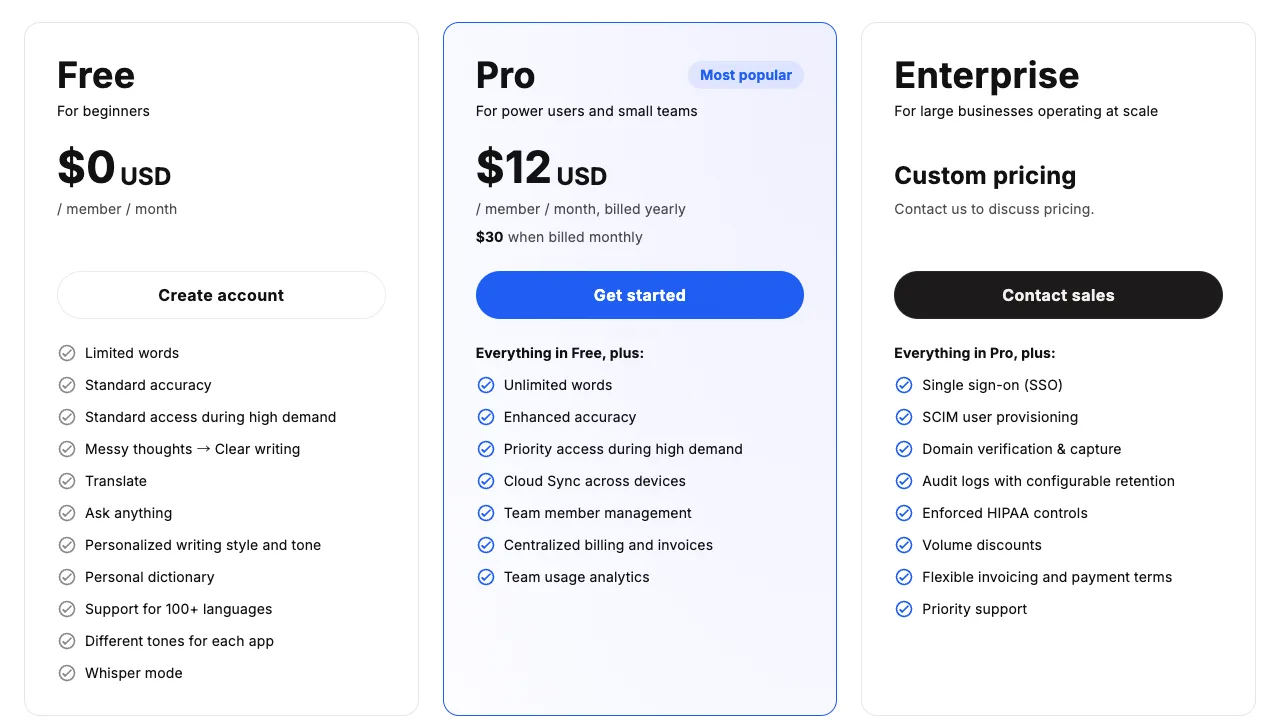
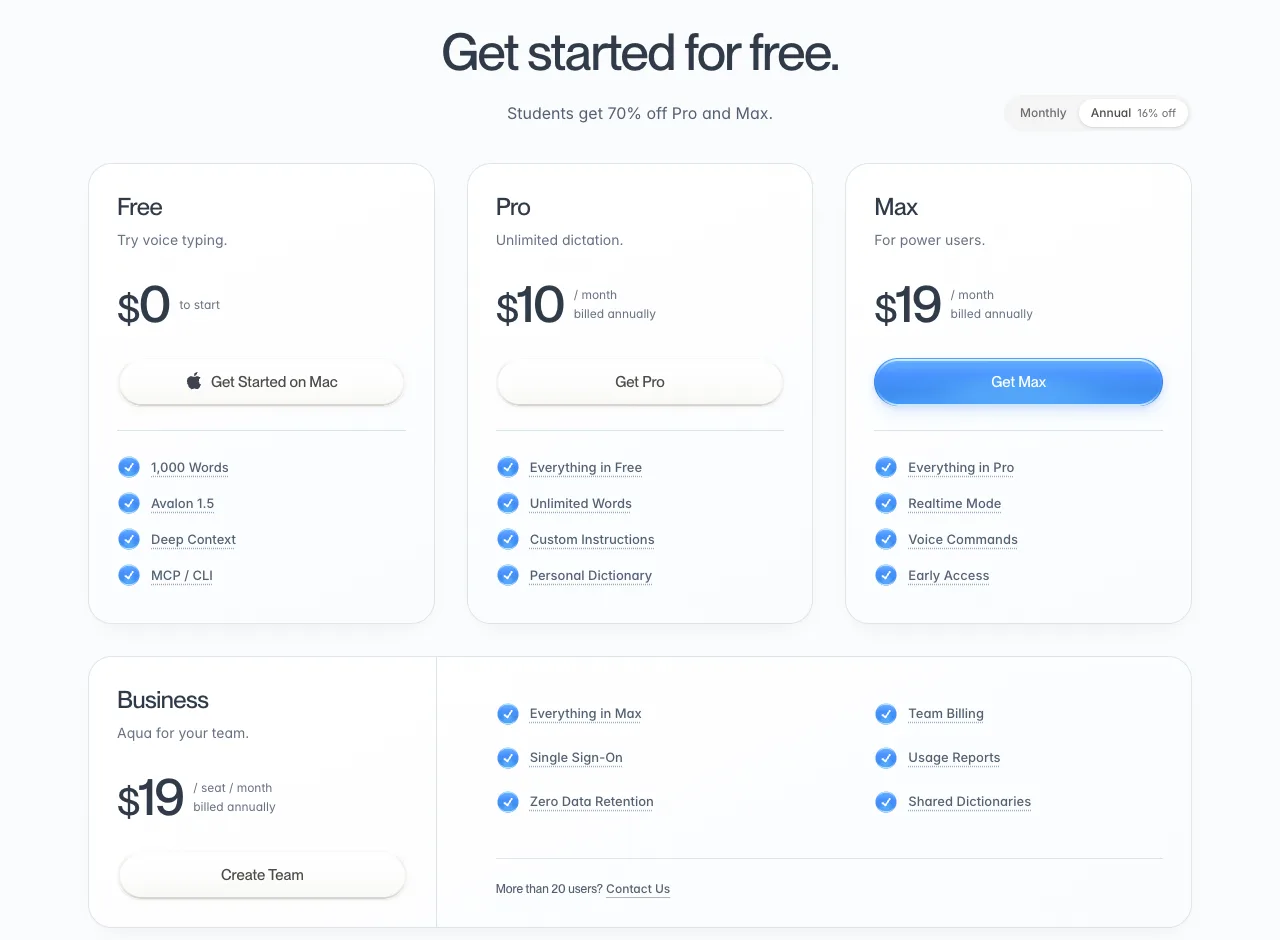
Put the two pricing pages side by side and you'll see that the large figure on both is the per-month price when billed annually.
- Typeless Pro: a large $12, with "$30 when billed monthly" in small type below
- Aqua Voice Pro: a large $10; switch the toggle at the top right to monthly and it becomes $12
So monthly to monthly, it's $30 vs $12, a big difference, while annual to annual, it's $12 vs $10, a much smaller one.
Both work in English and many other languages; official pages don't show how refined each one is
Typeless says it supports more than 100 languages and lists filler-word removal, a personal dictionary and per-app tones among its features. Aqua Voice's FAQ names English, Spanish, French, German, Japanese, Mandarin, Arabic "and more," and it offers Custom Instructions to tell it how to format.
Both say they support many languages, but how carefully each one handles formatting in a given language isn't something you can tell from the official descriptions. Try both with the kind of text you actually write.
On data handling, Typeless explains things more clearly
| Typeless | Aqua Voice | |
|---|---|---|
| Processing | Cloud; audio discarded immediately | Cloud (offline availability depends on platform and mode) |
| Audio storage | Not stored | Not confirmed |
| Text storage | History stays on your device (unless you turn on cloud sync) | If Privacy Mode is off, transcripts may be stored as needed to improve the product |
| Used for training | Not by Typeless or any third party | Not confirmed |
| Business assurances | Not confirmed | Business plan has Zero Data Retention; SOC 2 Type II, ISO 27001 |
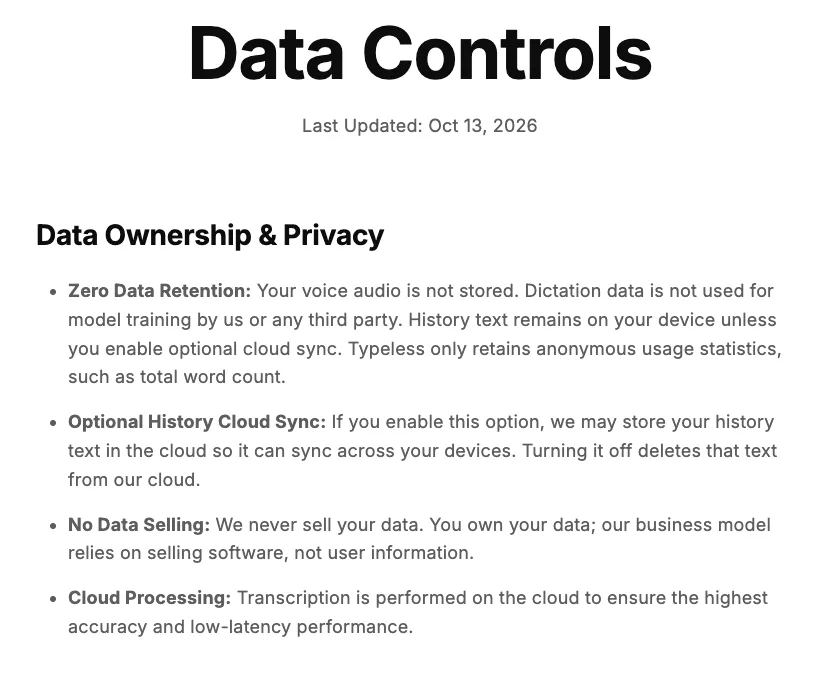
Typeless sums it up in the first item, "Zero Data Retention": audio isn't stored, and your data isn't used for training by Typeless or any third party. Aqua Voice says in its privacy policy that if Privacy Mode is off, it may store transcript data as needed to improve the product.
For individual users, Typeless's explanation is the clearer of the two. Aqua Voice doesn't state on its official pages whether Privacy Mode is on by default, so we recommend checking the setting before you start. The difference between local and cloud processing itself is covered in “Is local dictation safer?” (Local here means your audio is turned into text on your Mac instead of being sent over the internet; features such as formatting, sync or logs may still go online, so check each tool.)
 Read nextIs local AI dictation safer? Local vs cloud and their limitsProcessing your voice locally, so it never leaves your Mac, is a reassuring choice. But a Mac's computing power is limited, and that shows up in how well it hears you and how well it cleans up your text. And if you use a cloud tool, what should you check to use it with confidence? We lay out the limits of both.
Both run on Mac, Windows, iPhone and Android
Both support Mac, Windows, iPhone and Android. Typeless also supports Linux. Neither states requirements for Apple silicon versus Intel Macs on its official pages.
A third option: SayonaraType, built to keep your wording as you said it
If, after comparing the two, you feel "I don't want it to rephrase me" or "writing formatting instructions is a hassle," our own product, SayonaraType, is another option.
- It is built to clean up filler words, restarts, punctuation and line breaks, while keeping your meaning and tone as you said them. How well this works in English is still being researched
- Free to try: about 15 minutes of speech a week, with no credit card. The paid plan is currently available only in Japan
- We don't store your audio or text on our servers, and we process it with settings that keep it out of AI training
It currently runs only on Apple silicon Macs (macOS 14 or later). Windows and Intel Macs are in preparation (as stated on our official site).
If neither feels right, see the 12-app comparison
If neither fits, or you also want to compare tools that process locally, see “12 voice dictation apps for Mac, compared”, which lines them all up on the same points.
 Read nextMac dictation apps: 12 compared and ranked (October 2026)You want what you say to come out as text you can send. If that's why you're choosing a dictation app for Mac, four things matter most. We checked those four points for 12 apps using only what each company's official pages say. This article does not compare how well they hear you or how well they clean up your speech.
SayonaraType
A voice input app for Mac. Free to try — formatting for English is still being researched.
How we checked
We checked both companies' pricing pages, FAQs, data-handling pages and privacy policies on 2026-10-23, and re-checked prices and took screenshots on 2026-10-25. We did not measure recognition or formatting quality.
Sources
- Typeless pricing (typeless.com/pricing) and data controls (typeless.com/data-controls), checked 2026-10-23
- Aqua Voice pricing (aquavoice.com/pricing), FAQ (aquavoice.com/info/faq) and privacy policy (aquavoice.com/privacy), checked 2026-10-23